
Stitch vs Native: Repeatable Multi Voice TTS for Developers
Stitch vs Native: Repeatable Multi Voice TTS for Developers

Multi-voice TTS turns a labeled script into one stitched audio file where every speaker gets a distinct, consistent voice, control over rate, pitch, and pauses. Creators use it for podcast-style interviews, audiobook dialogue, training simulations, and game scenes where a single flat narrator voice would kill the effect. The output is production-ready when the tool handles speaker mapping, per-line prosody, and clean export in one pass, without you stitching clips by hand in an editor.
TL;DR:
- Multi-voice TTS produces consistent speaker voices in a single audio file, with limits on the number of speakers and reduced fidelity for long scripts.
- Stitch mode generates each speaker’s lines separately and concatenates them, while native dialog mode produces more natural flow but may blur speaker timbres.
- Proper script formatting, clear speaker labeling, and detailed prosody control are essential for high-quality multi-voice output and natural-sounding conversations.
- Cloud APIs like Gemini support SSML tags for pause and pronunciation adjustments and can export formats like MP3, WAV, and OGG; local rendering options require more resources.
- Arkian automates multilingual, multi-voice script packaging and output, ensuring consistent voice roles and structured files, ideal for teams managing multiple languages and large projects.
Table of Contents
- What Multi-Voice TTS Actually Produces
- Stitch Mode vs. Native Dialog: How the Audio Gets Built
- From Script to Stitched Track: A Step-by-Step Workflow
- Making Multi-Speaker Audio Sound Like People, Not Machines
- Developer Notes: APIs, SSML, and Where Rendering Happens
- Where Arkian Fits Into a Repeatable Multi-Voice Workflow
- Prototype in the Browser, Then Build the Real Pipeline
- A More Direct Path to Multilingual Voice Output
- Sources
- FAQ
What Multi-Voice TTS Actually Produces
Most people searching for a multi-voice text reader are trying to solve one of a handful of problems: a two-host podcast script that needs voicing before the real hosts record, an audiobook with dialogue-heavy chapters, a corporate training video with a trainer and a trainee character, or branching dialogue in a game. In each case, the output looks the same: a single WAV or MP3 file where “Maya” always sounds like Maya and “Devon” always sounds like Devon, from the first line to the last.
That consistency is the whole point. A tool that reassigns voices randomly between takes forces you to re-edit every export.
Expect real limits, too:
- Most platforms cap the number of distinct speakers per generation at a moderate number.
- Audio fidelity can drop as script length grows, especially with cloud renders under heavy token load.
- Emotional range per voice is usually narrower than a human voice actor’s, so highly dramatic scenes may need manual touch-ups.
Stitch Mode vs. Native Dialog: How the Audio Gets Built
Two engineering approaches sit behind almost every multi-voice tool, and the difference explains most of the quality complaints you’ll read in reviews.
Stitch mode renders each speaker’s lines separately, using a distinct voice model per speaker, then concatenates the clips into one track. Because each line is generated independently, stitch mode preserves timbral distinctness. It tends to produce a slightly mechanical rhythm between speaker turns, since the model never “hears” the other speaker’s line while generating its own.
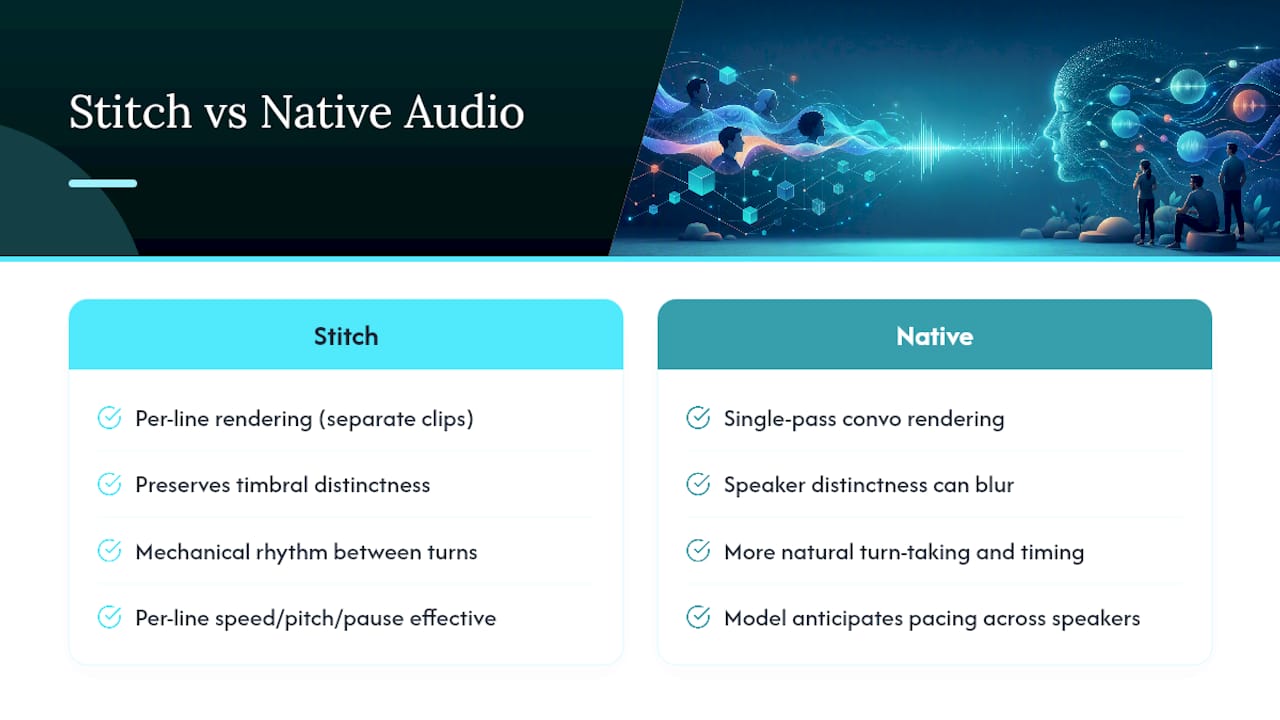
Native dialog mode generates the whole conversation in a single pass, which produces more natural turn-taking and timing because the model can anticipate pacing across speakers. The trade-off runs the other way: voice distinctness between speakers can blur slightly, since the model is optimizing for conversational flow rather than per-speaker identity.
Prosody is where either mode lives or dies. Per-line speed, pitch adjustment, and explicit pause markup are what separate a script that sounds like two people talking from one that sounds like a robot reading a transcript twice. Speaker labeling usually follows one of two formats: plain “Name:” prefixes on each line, or tag codes like <speaker id="1"> for tools with stricter parsers.
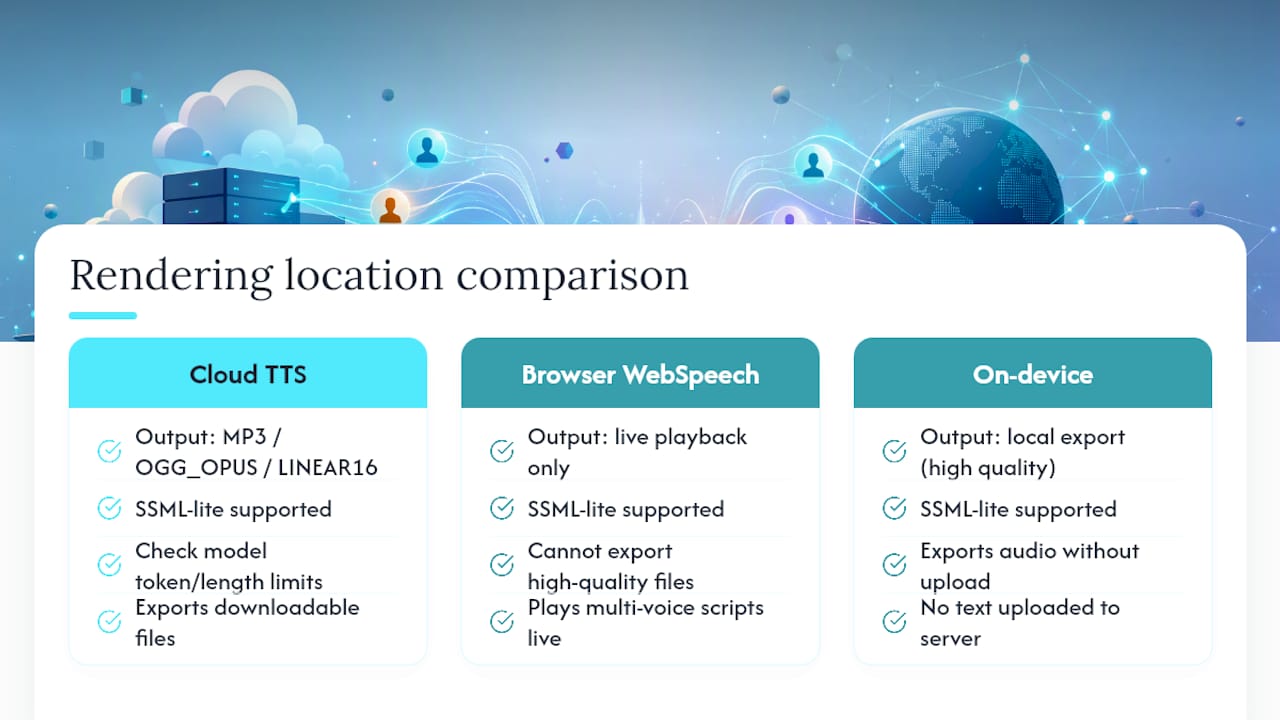
Where the audio actually renders matters for both export quality and turnaround. Cloud rendering handles longer scripts and heavier processing, but it requires uploading your text. On-device or browser-based rendering keeps the script local, at the cost of needing more client resources to load model weights.
From Script to Stitched Track: A Step-by-Step Workflow
Getting from a raw script to a clean, exportable file follows a fairly fixed sequence, whether you’re using a browser tool or a full production pipeline.
- Format the script with clear speaker labels. Use consistent “Name:” prefixes or tag codes on every line, and strip stage directions that aren’t meant to be read aloud.
- Run speaker detection or map speakers manually. Most tools scan the labels and auto-split the script into per-speaker chunks; verify the mapping before moving on, since a missed label usually merges two speakers into one voice.
- Cast a voice for each role. Assign one voice per speaker and lock it, so “Maya” doesn’t shift voices halfway through a long script.
- Set per-line prosody and pause tags. Adjust rate and pitch where a line needs emphasis, and mark pauses at natural breath points.
- Preview and fix pronunciation issues. Correct names, acronyms, or technical terms using SSML tags or a pronunciation dictionary before you commit to a full render.
- Generate and export the stitched track. Choose your output format (WAV for editing, MP3 for distribution) and render the full file.
- Run a quality pass. Listen for unnatural pauses, mismatched volume between speakers, or clipped words, and re-render only the affected lines rather than the whole file.
Pro Tip: Render your first pass at half the intended script length. Catching a mispronounced name or a dead-flat exchange on a short test saves you from re-rendering twenty minutes of finished audio.
Making Multi-Speaker Audio Sound Like People, Not Machines
The gap between “technically correct” and “actually listenable” multi-voice audio almost always comes down to a handful of habits.
- Mark pauses and breaths explicitly rather than trusting the model’s default timing, especially at emotional beats or topic changes.
- Write natural handoffs between speakers instead of clean, symmetrical turns. Real conversation has interruptions, short replies, and overlapping thoughts.
- Vary prosody subtly between roles. A narrator and a character shouldn’t share identical rate and pitch settings, even if their voices are already distinct.
- Keep a consistent voice palette across an entire project. Switching a supporting character’s voice between episodes breaks immersion fast.
- Choose stitch mode when timbral distinctness matters most, such as audiobooks with many named characters, and native dialog mode when conversational rhythm matters more, like a two-host podcast script.
- Build a pronunciation dictionary for names, brands, and technical terms, and test every exported file inside your actual editing timeline before calling it final.
Pro Tip: If a scene feels flat on playback, the fix is almost never a different voice. It’s usually a missing pause before the reply.
Developer Notes: APIs, SSML, and Where Rendering Happens
Cloud TTS APIs have converged on a similar pattern for multi-speaker generation. Gemini’s API, for example, uses a structured multi_speaker_voice_config object where you assign a named voice to each speaker key, then pass the labeled script as input. The Gemini-TTS documentation lists supported output formats including MP3, OGG_OPUS, and LINEAR16, along with model token and length limits worth checking before you send a full chapter in one request.
For control at the line level, most APIs support SSML-lite tags for pauses (<break time="500ms"/>), phoneme overrides for tricky pronunciations, and rate or pitch adjustments scoped to a single line rather than the whole request. Pronunciation dictionaries reduce the number of manual SSML fixes over a long project.
On rendering location: the browser’s native Web Speech API can play multi-voice scripts live, but it generally can’t export downloadable, high-quality audio files without pairing it with an on-device neural renderer or a server-side render step. On-device models like SpeechT5 let you export audio without uploading text to a server, which matters for scripts containing sensitive or unreleased content, at the cost of heavier local resource use. For long scripts, chunk by scene or speaker turn rather than by arbitrary character count. Some open-source projects on GitHub document working stitch and native-dialog pipelines worth reviewing before you build your own.
Where Arkian Fits Into a Repeatable Multi-Voice Workflow
Individual scripts are one problem. Keeping voice-role assignments consistent across five languages and forty files is a different one entirely. Arkian automates the parts that break down at scale: script packaging, voice output generation, and validated language bundles that don’t require repository access or a full translation management system to manage.
The practical value shows up in three places: the same speaker keeps the same voice across every language variant, outputs arrive as structured files (JSON, strings, YAML alongside the audio) rather than loose clips, and every package is review-ready before it reaches a developer’s build. Arkian’s multilingual voice production work with the Quiet Harbour app is a working example of that consistency holding across a real multilingual release.
Prototype in the Browser, Then Build the Real Pipeline
Test scripts in a browser tool first. It’s fast, free, and tells you whether stitch mode or native dialog fits your material before you commit engineering time. Once a project needs repeatability across languages or long-term maintenance, that ad-hoc approach breaks down fast. Structured metadata and role mapping stop being nice extras and start being the only thing keeping ten locales in sync.
— Arkian
A More Direct Path to Multilingual Voice Output
Building your own stitch-versus-native-dialog pipeline from scratch works fine for one script in one language. It gets expensive fast once you’re maintaining voice consistency across five locales, tracking which speaker maps to which voice in each language, and manually repackaging exports every time a line changes. Arkian is the alternative to building that pipeline yourself: it automates script packaging, multilingual voice output, and validated file delivery in one pass, without needing repository access or a translation management system layered on top.

Arkian’s setup fits small teams and solo developers who need:
- Consistent voice casting per speaker role, held across every target language
- Structured output files (JSON, strings, YAML) alongside the rendered audio, packaged for review
- A workflow that skips manual TMS setup entirely
If your project already has a script and a cast of speaker roles, Arkian’s multilingual voice production page walks through how a job moves from script to packaged output. Plans start with the Arkian Membership at $19.00 CAD per month, or you can review the Starter, Pro, and Studio one-off options if a single production run is all you need right now.
Sources
For implementation details beyond this guide, check the Gemini API’s speech generation docs for multi-speaker code examples, the Zilliz prosody FAQ for pause and pitch control patterns, and the SpeechT5 setup guide for on-device rendering notes. Voice assistant builders may also find the conversational voice AI overview useful for adjacent use cases.
FAQ
What Is Multi-Voice TTS?
Multi-voice TTS is text-to-speech generation that assigns distinct voices to different speakers within a single script, producing one stitched audio file instead of separate clips per line. It relies on speaker labels in the script and a voice-casting step to keep each role consistent.
How Does Multi-Voice TTS Differ From Regular TTS?
Standard TTS reads a block of text in one voice from start to finish. Multi-voice TTS detects speaker labels, assigns a separate voice to each one, and renders a conversation with distinct roles and, in native dialog mode, more natural turn-taking.
Can I Export Multi-Voice Audio as MP3 or WAV?
Yes. Most cloud TTS platforms, including Gemini-TTS, support MP3, WAV-compatible LINEAR16, and OGG_OPUS export formats. Browser-only tools using the Web Speech API typically can’t export files without an added on-device or server-side render step.
What’s the Difference Between Stitch Mode and Native Dialog Mode?
Stitch mode renders each speaker’s lines separately for stronger voice distinctness, while native dialog mode generates the full conversation in one pass for smoother timing between speakers. Choose stitch mode for character-heavy audiobooks and native dialog for conversational podcast-style scripts.
Does Arkian Support Multi-Voice TTS for Localization?
Arkian supports multilingual voice production that keeps consistent voice-role assignments across languages, packaged alongside structured metadata files. Pricing starts at the Arkian Membership, listed at $19.00 CAD per month, with one-off Starter, Pro, and Studio options also available.