
Localization Testing Automation: CI/CD, TypeScript, and TTS for Dev Teams
Localization Testing Automation: CI/CD, TypeScript, and TTS for Dev Teams

Localization testing automation, in practice, means using a platform to automatically generate translations, TTS voice files, and validated multilingual packages instead of manually managing spreadsheets and file exports. Small teams get release-ready language bundles with far less manual work and fewer last-minute errors. The rest of this guide covers what these platforms actually do, the capabilities worth demanding, and how to plug one into your release pipeline.
TL;DR:
- Automated localization platforms support multiple formats like JSON, iOS
.strings, Android XML, YAML, and TypeScript, ensuring fidelity and metadata preservation across all files.- Using diff-aware translation caching and translation memory can significantly reduce costs for teams with frequent small releases, avoiding re-translation of unchanged segments.
- Validation before file writing, including placeholder checks and dry-run modes, helps catch errors early and prevents format, key, and syntax issues from reaching production.
- Integrating automation into CI/CD workflows should start with small, scoped pilots focusing on release speed and validation impacts before expanding to full product coverage.
- Human review remains crucial to catch tone, cultural, or context issues that automation and AI translation cannot address reliably.
Table of Contents
- What Does Automated Localization Production Actually Cover?
- What Do Small Teams Actually Gain From This?
- What Should You Require From a Localization Production Platform?
- How Do You Wire This Into Your CI/CD Pipeline?
- How Arkian Handles Localization Production in Practice
- Your First Automated Localization Job: A Checklist
- Common Challenges and Pitfalls in Localization Testing Automation
- Security and Privacy Considerations in Automated Localization Workflows
- Case Studies: What Successful Localization Automation Actually Looks Like
- Functional, Linguistic, and Pseudo-Localization Checks Explained
- Where Arkian Fits Into Your Localization Pipeline
- When Automation Is the Right Move, and When It Isn’t
- Sources
What Does Automated Localization Production Actually Cover?
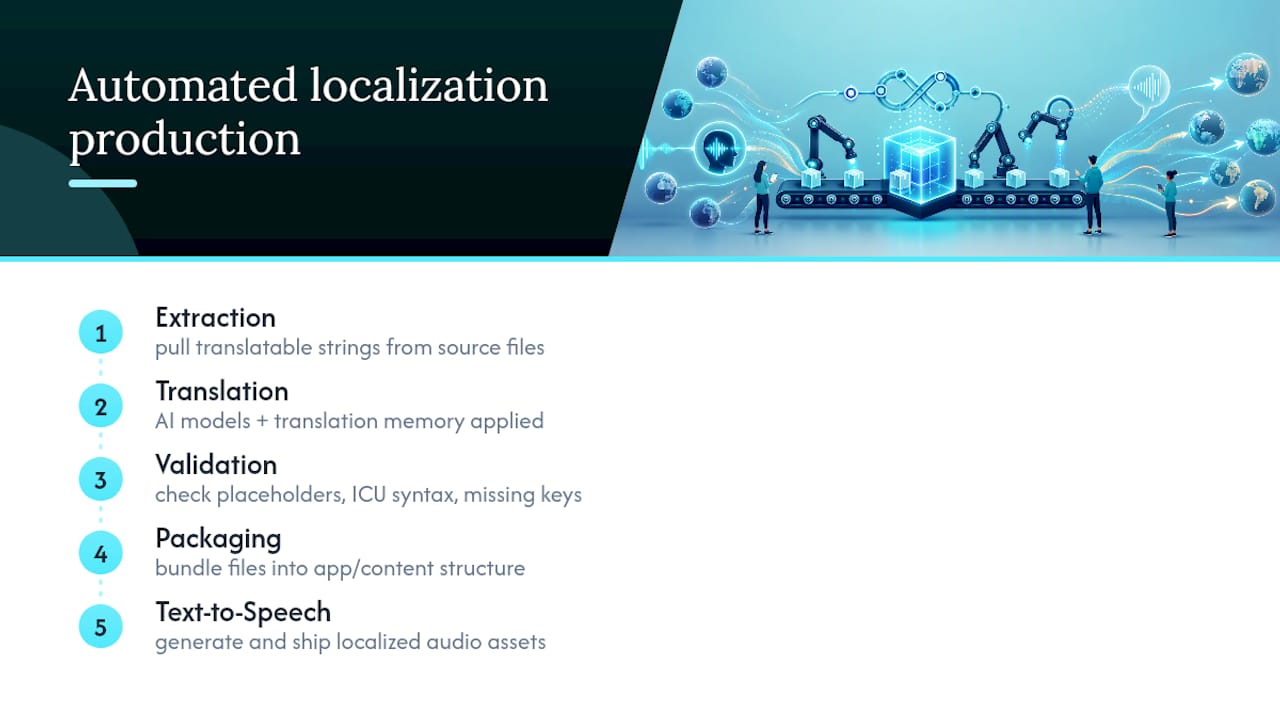
Automated localization production handles four connected jobs: extraction, translation, validation, and packaging, plus a fifth for teams shipping audio, text-to-speech generation. Extraction pulls translatable strings out of your source files. Translation runs those strings through AI models, often backed by a translation memory so repeated phrases don’t get re-billed every cycle. Validation checks the output against format rules (placeholders, ICU message syntax, missing keys) before anything gets written to disk. Packaging bundles the results into the file structure your app or content system expects.
Format support matters more than most teams realize going in. A platform built for this should read and write JSON, iOS .strings, Android XML, YAML, and TypeScript declaration files, because that’s the actual spread of formats used across mobile, web, and backend projects. Tools like i18n-ai-translate document format-aware translation across exactly this range.
One clarification worth making up front: this is not the same discipline as automated QA testing that checks UI truncation or layout breakage across locales. That’s a separate practice with separate tooling. This guide is about the production side, the pipeline that creates and packages the assets those QA tools would later inspect.
What Do Small Teams Actually Gain From This?
The most immediate gain is release velocity. Manually exporting strings, emailing them to a translator, and re-importing files can add days to a release cycle. Automating that loop compresses it to minutes, and Smartling’s breakdown of localization workflow automation notes that continuous detection and job creation eliminates most of the manual handoff steps entirely.
Quality improves too, in a specific way: format-aware validation catches missing keys and broken placeholders before they ship, and generated TypeScript declaration files give you compile-time checking so a missing translation key throws a build error instead of a runtime crash in production.
Cost control comes from being selective about what actually gets re-translated:
- Diff-aware translation sends only changed segments to the AI model, not the whole file
- A translation memory or cache reuses prior translations for repeated phrases
- Glossary and context settings cut down on correction rounds later
A quick way to see the savings: teams running frequent small releases often re-translate the same handful of changed strings dozens of times a month. Caching that. CLI tools like ai-i18n-tools build in a file or SQLite cache specifically to avoid re-sending unchanged segments.
Deliverables go beyond text files, too. A team shipping narrated onboarding or in-app audio gets structured TTS output, individually named audio files per locale, packaged alongside the text bundle rather than produced as a separate afterthought.

What Should You Require From a Localization Production Platform?
Not every platform in this space handles the same ground. Before you commit to one, run down this list.
- Format-aware round-trip fidelity. The platform should read and write JSON, TypeScript, iOS
.strings, Android XML, and YAML without losing metadata or breaking placeholder syntax on the way out. - Context-aware AI translation with a glossary. Generic machine translation misses brand terms and tone. A glossary layer and project context materially reduce correction cycles.
- A translation memory or cache. This is what keeps repeated releases affordable. Look for diff-aware translation specifically, not just a general TM database.
- Validation before write. Placeholder checks, ICU format checks, missing-key detection, and a dry-run mode that shows you the diff before anything touches your files. i18n-ai-translate’s documentation treats check and dry-run modes as standard, not optional extras.
- CLI, API, and CI/CD hooks. You want this callable from a pipeline step, not exclusively through a web dashboard.
- A predictable output structure. Downloadable bundles organized by locale, with a folder structure your build system can consume directly.
- A real TTS pipeline. If you need voice, the platform should generate named audio assets per locale and fold them into the same packaged output as your text.
Pro Tip: Ask any platform you’re evaluating whether its cache is diff-aware at the segment level, not the file level. File-level caching still re-translates an entire file when one string changes, which quietly erases most of the cost savings you were counting on.
How Do You Wire This Into Your CI/CD Pipeline?
Getting automated localization production into your release workflow is a five-step build, and none of the steps require touching your existing translation management setup.
- Inventory your source formats and pick a pilot scope. Don’t automate your whole app on day one. Pick one feature or one documentation page as a test run.
- Add extraction to your CI as a CLI step or repo hook. Configure your target locales at this stage so extraction and translation share the same locale list.
- Turn on AI translation with glossary and context, and enable the cache. This is where diff-aware translation pays off. Feed it your brand terms once and reuse them every run.
- Run validation in dry-run mode first. Let a human reviewer look at the diff in a pull request before anything merges. The i18n-ai-translate README specifically recommends dry-run checks inside pull requests for exactly this reason, catching bad output before it ships rather than after.
- Package and publish as a release-pipeline step, not a per-PR step. Run final packaging (language folders, audio assets, metadata) when you cut a release, not on every commit. This keeps your PR history clean and avoids generating noisy build artifacts on every push.
Measure two numbers from the start: time from “string written” to “translation available for review,” and how many validation catches happened before a human ever saw the output. Both numbers tend to improve fast once the pipeline settles in, and both give you a clean before/after case to justify expanding scope beyond your pilot.
How Arkian Handles Localization Production in Practice
Arkian’s platform covers the format range small teams actually need day to day: TypeScript localization files with generated type declarations, Android XML strings, iOS .strings files, and JSON or YAML output for backend and web projects. Validation and packaging run as part of the same job, so a translation batch doesn’t leave your hands until it’s already checked and bundled.
What that looks like in practice:
- TypeScript output ships with generated declaration files for compile-time checking
- Android and iOS string formats are supported natively, no manual reformatting after export
- JSON and YAML packages follow a consistent, predictable folder structure
- Structured multilingual TTS generation produces named audio files per locale alongside the text bundle
- Validation and packaging run inline, without requiring repository access or a separate TMS
Arkian’s collaboration with the Quiet Harbour app is a working example of this in action: a multilingual rollout where text and voice assets needed to stay coherent across every supported language, not just individually correct. That’s a harder bar than translating strings in isolation. It means the tone in the German audio file has to match the tone in the German text file, and the packaging step has to keep both in sync automatically rather than relying on someone to check by hand.
Your First Automated Localization Job: A Checklist
Run your first job small. Here’s the sequence:
- Pick a narrow scope. One screen, one doc page, or one onboarding flow. Two or three target languages, not twelve.
- Enable diff-only translation from the start. There’s no reason to pay full translation cost on a pilot when caching is available from day one.
- Run the full sequence: extract, then translate in dry-run mode, then validate, then package.
- Have a native speaker review the output before it goes live. Automation catches format errors, not tone or cultural fit.
- Track two numbers: time saved versus your old manual process, and how many issues validation caught before a human saw them.
Pro Tip: Set up your glossary and translation cache before you run your first real job, not after. Retrofitting a glossary onto translations that already exist means paying to re-translate everything you already paid to translate once.
Expand scope only after the pilot numbers look good. Teams that skip this step and automate everything at once tend to spend their first month debugging format edge cases across a dozen files instead of one.
Common Challenges and Pitfalls in Localization Testing Automation
The most common mistake is treating automation as fully hands-off from the start. Even the best format-aware validation won’t catch a translation that’s technically correct but tonally wrong for your brand, or a phrase that reads fine in isolation but breaks when it sits next to a shorter neighboring string in the UI. Human review still matters, especially in the first few cycles.
Placeholder and variable mishandling is another recurring issue. A translation engine that doesn’t understand ICU message syntax or platform-specific placeholder formats can silently corrupt a string, look fine in a diff, and only break at runtime. This is exactly why dry-run and check modes exist in tools like i18n-ai-translate: catching it before the file gets written costs nothing, catching it in production costs a hotfix.
Cache staleness causes quieter problems. If your translation memory holds an old, incorrect translation for a phrase that later gets corrected upstream, a diff-aware cache will happily keep reusing the bad version unless you explicitly invalidate it. Build a habit of clearing entries tied to strings you’ve manually corrected.
Scope creep kills a lot of pilots, too. Teams that try to automate their entire string inventory in one push often end up debugging edge cases across a dozen files simultaneously instead of learning the pipeline on one. Start small, expand once the pipeline is proven, and keep your glossary current as your product vocabulary shifts.
Security and Privacy Considerations in Automated Localization Workflows
Source strings often carry more than generic UI text. Error messages, onboarding copy, and support content can reference user data, internal feature names, or business logic you don’t want floating through a third-party system without oversight.
A platform that doesn’t require full repository access is a meaningful advantage here. Instead of granting a translation vendor read access to your entire codebase, a well-scoped localization production tool only touches the specific files or strings you hand it for a given job. That’s a narrower blast radius if anything ever goes wrong on the vendor side.
Ask any platform directly: where does the source content go during processing, how long is it retained, and does the AI provider handling translation use your content to train its own models. Vendors vary widely here, and the answer should be in writing, not verbal reassurance.
For teams in regulated industries, healthcare, finance, anything touching personal data, check whether your source strings ever contain real user data (they shouldn’t, but placeholder text sometimes leaks in from testing). Scrub sample data out of your source files before they hit any translation pipeline, automated or not. It’s a five-minute check that prevents a real problem.
Finally, treat your glossary and translation memory as assets worth protecting too. They often encode brand terminology and internal naming conventions that competitors would find useful. Standard access controls on your account, not shared logins, go a long way.
Case Studies: What Successful Localization Automation Actually Looks Like
The clearest pattern across working implementations isn’t a specific tool choice. It’s scope discipline. Teams that succeed with localization production automation almost always start with a narrow pilot, one feature, one language pair, before expanding.
Arkian’s work with the Quiet Harbour app illustrates the shape of a successful rollout: text and voice assets needed to land coherently across every supported language simultaneously, which meant validation and packaging had to run as one connected process rather than two separate handoffs. The lesson generalizes past this one collaboration. Whenever text and audio assets ship together, treating them as one packaged unit, rather than translating text first and bolting on voice later, prevents a mismatch between what a user reads and what they hear.
A second pattern worth naming: teams that adopted diff-aware caching early report a much flatter cost curve as their release frequency increases. Since only changed segments get re-sent to translation, doubling your release cadence doesn’t double your translation spend the way it would with a naive full re-translation approach every cycle.
Functional, Linguistic, and Pseudo-Localization Checks Explained
Three distinct checks matter once your assets are generated, and they catch different classes of problems.
Functional checks confirm the mechanics work: placeholders resolve correctly, no key is missing from any locale file, and the app doesn’t crash when it loads a translated string. This is largely what automated validation inside a production pipeline handles directly, checking format integrity before a file ever gets written.
Linguistic checks confirm the translation itself is accurate, natural, and on-brand. This is where AI translation quality and glossary context matter most, but it’s also where a human native-speaker reviewer earns their keep. No amount of format validation catches a translation that’s grammatically correct but tonally off for your brand voice.
Pseudo-localization is a targeted stress test: you replace source strings with elongated, accented, or bidirectional dummy text to see how your UI handles text expansion and unusual character sets before real translations exist. It’s a UI-layout check rather than a content-accuracy check, and it typically happens upstream of the production pipeline covered here, since it’s testing your app’s tolerance for longer or differently-shaped text rather than testing the translations themselves.
Each check catches something the others miss. Functional validation won’t flag a mistranslation, linguistic review won’t catch a broken placeholder, and neither will tell you that German text overflows a button that was sized for English. Treat them as complementary passes, not substitutes for each other.
Where Arkian Fits Into Your Localization Pipeline
Arkian is built specifically for the checklist covered above: broad format support across JSON, iOS, Android, TypeScript, and YAML, CLI and CI-ready workflows, structured TTS output, and packaging that runs inline without requiring repository access or a separate translation management system.

If your team ships in multiple languages on a regular release cycle, that combination, format fidelity plus validation plus packaging in one job, is what actually removes the manual bottleneck instead of just moving it somewhere else. Check who Arkian is built for to see if your team’s setup matches, then look at the multilingual output folder structure to see exactly what a packaged delivery looks like before you commit to anything.
Start with a small pilot job, the same way this guide recommends approaching any automation rollout: pick one feature, two or three languages, and run it through Arkian end to end. If it saves the time it claims to save, expanding scope is a straightforward next step, not a leap of faith.
When Automation Is the Right Move, and When It Isn’t
Automation earns its place on repetitive, release-critical content, app strings, recurring UI copy, anything that ships on a cycle. That’s where diff-aware caching and format validation pay for themselves fastest. Rare, high-stakes translations, a legal contract, a one-off marketing campaign with heavy cultural nuance, still deserve a slower, more manual hand.
Don’t automate everything on day one. Run a pilot, measure time-to-release and validation catches, then expand based on what the numbers actually show rather than what seemed impressive in a demo. Arkian’s own format-specific resources are worth working through once you know which file types your pilot needs.
— Arkian
Sources
- i18n-ai-translate (GitHub README)
- How to Automate Your Localization Workflow with AI (Smartling blog)