
6 Steps to Translate YAML Anchors Safely for Small Teams
6 Steps to Translate YAML Anchors Safely for Small Teams

Yes, you can translate YAML files with anchors and get review-ready packages out the other end, but only if you extract translatable values instead of touching the raw file. Anchors, aliases, and placeholders have to stay untouched while translation happens around them, then get validated before anyone ships. The process involves automated extraction, validation, and packaging into per-locale folders, with no repository access required.
TL;DR:
- Translators should only modify translatable string values, keeping anchors, aliases, and placeholders untouched to prevent structural errors.
- Running key parity, linting, placeholder consistency, and anchor integrity tests is essential to catch translation errors before release.
- Automatically extracting strings, validating, rehydrating, and packaging YAML files minimizes manual errors and streamlines the translation workflow.
- Altering anchor names or moving placeholders during translation can cause missing content or app load failures due to broken linkages.
- Automated pipelines like Arkian can handle extraction, validation, and packaging, saving time and reducing errors for small teams managing multiple locales.
Table of Contents
- Yaml Anchors Translations: Quick Verification Checklist
- Why Do Yaml Anchors Break During Translation?
- How to Translate Yaml With Anchors Step by Step
- What Automated Checks Catch YAML Translation Errors?
- How Should Translated Yaml Files Be Packaged for Review?
- When to Automate Yaml Translation vs. Bring in Engineering
- Get Packaged, Review-Ready YAML Translations With Arkian
- Sources
- FAQ
Yaml Anchors Translations: Quick Verification Checklist
Before you accept a translated YAML file from anyone, whether that’s a freelance translator, an agency, or an automated pipeline, run it through a short gut check. This is the fastest way to catch a broken build before it reaches a reviewer’s desk.
- Key parity: every key and nesting level in the translated file matches the source file exactly, with nothing missing or added.
- Anchors and aliases untouched:
&anchors and*aliases are preserved character for character, never translated or renamed. - Placeholders stay intact: variables like
{name}or%sappear in the same form and order as the source, unless a developer has explicitly approved a change. - Block scalars survive: multiline strings using
|or>keep their exact indentation, since YAML treats whitespace as structural, not cosmetic. - Linting passes clean: every output file runs through a YAML linter and a key-match parity test before anyone reviews it for tone or accuracy.
Skip any one of these and you’re not shipping a translation. You’re shipping a bug with a language tag on it.
Why Do Yaml Anchors Break During Translation?
An anchor (&) marks a node so it can be reused elsewhere; an alias (*) points back to that node instead of duplicating it. This is YAML’s built-in way of avoiding repetition, and it’s also exactly why translating YAML carelessly is riskier than translating a flat JSON file. Change an anchor name, or let a translation tool “helpfully” expand an alias into full text, and the runtime data shifts under your feet.
Here’s the mechanism that actually causes damage. Translating a key or an anchor label breaks the link between the alias and the node it’s supposed to point to, which can leave your app pulling in missing content or throwing a structural error on load. Structured formats like YAML mix code-level syntax with translatable strings, and sending that raw mix to a generic translation tool routinely corrupts tags, anchors, and structure that the tool has no reason to recognize as special.
Whitespace makes this worse. YAML uses indentation to define hierarchy, so a translator (or a copy-paste error, or an overly aggressive text editor) that shifts two spaces can silently reorder your document’s structure. Add placeholders into the mix, tokens like {count} sitting inside translatable strings, and you’ve got two separate categories of “do not touch” content that both need protecting during the same extraction pass.

How to Translate Yaml With Anchors Step by Step
Producing translated YAML that comes out review-ready isn’t a single action, it’s a short pipeline. Here’s the sequence that holds up in production.
- Extract. Parse the YAML into its abstract syntax tree and pull out only the translatable string values. Anchors, aliases, placeholders, and block scalar types get logged in metadata, not sent to translators.
- Lock keys. Generate a key-parity manifest listing source keys, anchor IDs, and placeholder tokens. This becomes your comparison baseline once translation is done.
- Translate. Run the extracted strings through machine translation, human review, or both. Anything that interacts with an anchor or alias should carry a context note so translators understand what not to touch.
- Rehydrate. Reinsert the translated strings into the original structure using the recorded metadata, so anchors and aliases come back exactly as they went in. Specialized YAML translation tools that operate on the parsed tree rather than raw text handle this step reliably, because they treat anchors as non-translatable nodes from the start.
- Validate. Run YAML linting, key-match parity checks, and placeholder token verification. A lightweight schema or snapshot diff catches structural drift you’d otherwise miss.
- Package. Assemble per-locale folders with consistent file names, an artifacts manifest, a QA report, and a checksum for each file.
Pro Tip: Give translators a short context note anywhere a string sits near an anchor reference, even something as simple as “this label appears three times via alias, keep it short.” It costs you one sentence and saves a round of confused revision requests later.
This is also where a platform like Arkian’s YAML localization workflow earns its keep. Doing all six steps by hand for every locale, every release, gets old fast for a two-person team. Automating extraction and rehydration means the anchor logic never touches human hands at all.
What Automated Checks Catch YAML Translation Errors?
Manual review alone won’t reliably catch a corrupted anchor or a shifted placeholder. Even expert human translators introduce whitespace and indentation errors that are invisible on screen but fatal to a parser, which is exactly why linting belongs in your pipeline, not just in someone’s mental checklist.
The tests that matter most:
- YAML linting across every file in the locale set, checking syntax, indentation, and duplicate keys.
- Key parity tests that fail the pipeline the moment a locale file is missing a key the source file has, or has one the source doesn’t.
- Placeholder token checks confirming that
{name}-style variables exist and appear in the same form and order as the source, unless a change was explicitly approved. - Anchor and alias integrity tests that confirm recorded anchor IDs are still present and every alias resolves to its intended node.
- A small runtime smoke test, where feasible, loading a sample of localized strings into the app to catch interpolation errors before a human reviewer ever sees them.
Wire these in as pre-merge or post-translation gates. A file that fails key parity or anchor integrity should never reach a release folder, let alone a reviewer’s inbox.
How Should Translated Yaml Files Be Packaged for Review?
A translated file with no context around it is hard to review and easy to mishandle. Structure matters here as much as accuracy.
- One folder per locale, such as
locales/fr/andlocales/es/, each mirroring the exact file names found in the sourceen/directory. - An artifacts manifest (
manifest.json) listing every file, its checksum, anchor and alias metadata, and the key-parity report for that locale. - A human-readable QA summary (
qa-report.md) noting anything flagged during validation, plus translator notes on tricky strings.
For teams running this through Arkian, this packaging step happens automatically. Arkian generates the per-locale folder structure with manifests and validation reports attached, so what lands in your inbox is a ready-for-review archive, not a pile of loose files you have to sort and check by hand.
When to Automate Yaml Translation vs. Bring in Engineering
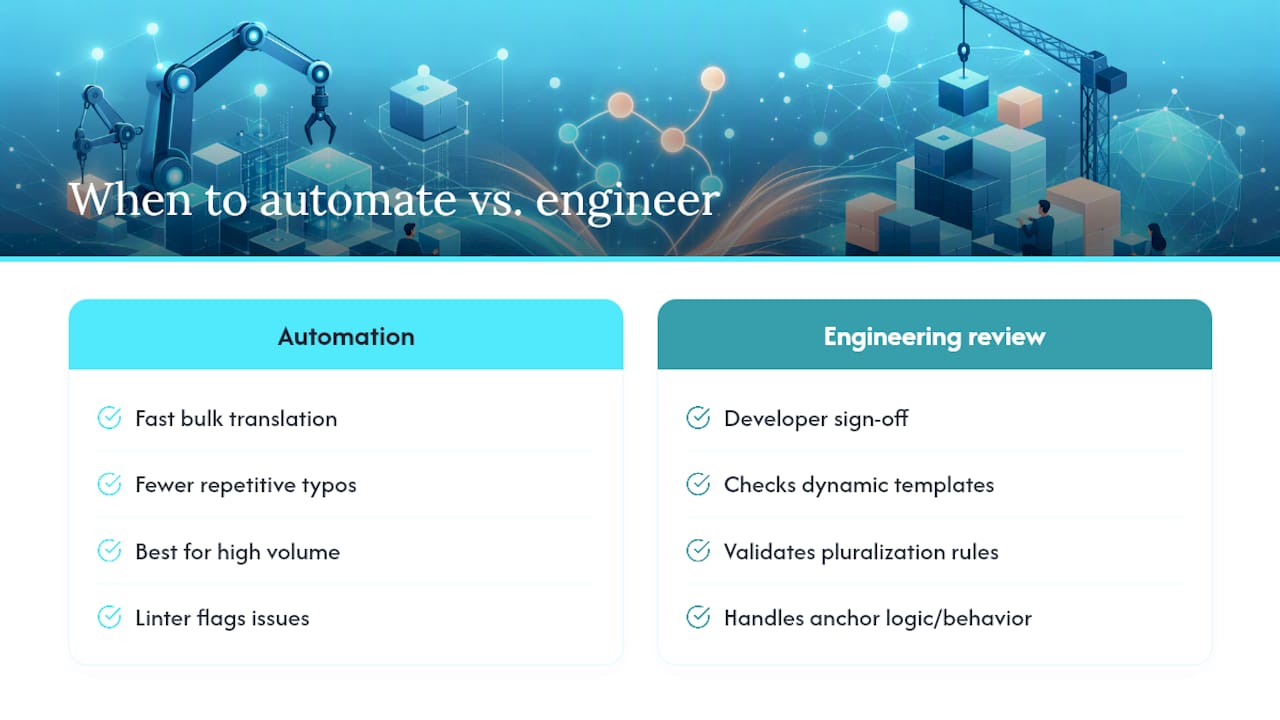
Automation handles the bulk translation work faster and with fewer typos than a human doing repetitive string-by-string edits, but it isn’t the right call for every string. Dynamic templates, pluralization rules, and anchors that carry structural weight (not just reused text, but logic your app depends on) deserve a developer’s eyes before release.
The practical split: let automation own the volume, and route anchor-heavy or logic-tied strings to a short engineering review. A tight feedback loop between engineering, product, and language reviewers catches the handful of high-risk items that a linter can flag but can’t fully judge on its own. Treat any anchor that affects layout or app behavior as a review item by default, not an exception.
— Arkian
Get Packaged, Review-Ready YAML Translations With Arkian
Hand-checking anchor integrity across five locale files is tedious even once. Doing it every release cycle, on top of running your own extraction scripts and linters, is where small teams lose hours they don’t have. This manual loop can be replaced with automated extraction, validation, and packaging built specifically for structured files like YAML.

Arkian pulls translatable strings out of your YAML files while keeping anchors, aliases, and placeholders locked in metadata, then runs the validation checks (key parity, linting, placeholder integrity) before anything reaches you. The output arrives as organized per-locale folders with manifests and QA reports already attached, with no repository access and no translation management system setup required. Similar pipelines have been demonstrated to hold up in live, multilingual products. If your team is translating YAML strings alongside other formats, check whether Arkian fits your workflow and request a demo to see a packaged output firsthand.
Sources
- How to Translate YAML Files with Ease
- Automated syntax linting and placeholder guidance (Kinto blog)
FAQ
Can YAML Anchors Be Safely Translated?
Anchors themselves should never be translated. Only the string values they point to get extracted, translated, and reinserted, while the anchor and alias structure stays exactly as written in the source file.
What Happens if a Translator Changes an Anchor Name?
Renaming or altering an anchor breaks the link between it and every alias referencing it, which can cause missing content or a parsing error when the app loads that file.
Do Placeholders Need Special Handling in YAML Translation?
Yes. Placeholders like {name} or %s must stay in the same form and order as the source unless a developer explicitly approves a change, since altering them breaks runtime interpolation.
How Does Arkian Handle YAML Files With Anchors?
Arkian extracts only translatable strings from YAML files, preserves anchors, aliases, and placeholders in metadata, and delivers validated, packaged per-locale folders ready for review without requiring repository access.
What CI Checks Should Run on Translated YAML Before Release?
At minimum: YAML linting, key-match parity between source and translated files, placeholder token verification, and an anchor/alias integrity check confirming every alias still resolves correctly.