
Store Page First, Skip the TMS: Indie Game Localization for Small Teams
Store Page First, Skip the TMS: Indie Game Localization for Small Teams

Yes, localize, but start small: translate your store page before you touch a single line of in-game dialogue. That single move tests real demand with almost no engineering cost, and it tells you within weeks whether full indie game localization will pay for itself. Check your store’s country-level installs and wishlist data first, then decide how far to go.
TL;DR:
- Localizing store pages into a few key languages like Chinese, Japanese, or German often significantly increases discoverability, click-through rates, and purchase conversions.
- Starting with store-page translations as a low-cost test helps determine genuine market demand before investing heavily in full game localization.
- Prioritizing a small set of languages based on actual install data yields better ROI than spreading efforts across many languages without validation.
- Tools like pseudo-localization and staged QA can catch UI and formatting issues early, saving money and reducing post-release fixes.
- Small teams benefit from automation platforms that streamline file packaging and validation, avoiding complex TMS setups and ensuring efficient updates.
Table of Contents
- Why indie game localization pays off in reach and revenue
- Is localization actually worth it for your game?
- DIY, freelancers, fan translation, or a managed studio?
- What to prepare technically before you send anything to a translator
- How do you catch localization bugs before players do?
- How much time and budget should you set aside?
- Where can indie developers find localization help and community support?
- How does Arkian handle production for small teams without a TMS?
- What matters most in indie localization decisions
- Get your localization files production-ready with Arkian
- Sources
Why indie game localization pays off in reach and revenue
Localization is not a nice-to-have polish pass. It changes which players even see your game.
Storefronts like Steam and Google Play weight discoverability partly on how many languages a listing supports, so a game visible only in English is invisible to a huge share of the algorithm’s recommendation pool. Developers interviewed about their own launches consistently report that localizing store pages and full builds raised wishlist conversion and purchase rates in the markets they targeted. Several called out Chinese localization specifically as disproportionately effective, a pattern echoed across genres from puzzle games to narrative RPGs.
The mechanism is straightforward. A German or Brazilian Portuguese player scrolling a storefront in their own language is more likely to click, more likely to trust the purchase, and more likely to leave a review that boosts your visibility further. None of that requires German or Portuguese voice acting. It requires a translated description, translated screenshots, and maybe subtitled trailer text.
Store-page localization works as a low-cost test because it separates two different questions: does this market want my game, and can I afford to fully translate it? You can answer the first question for the cost of a freelance translation job that runs a few hundred words, long before committing to a scope that could run into the tens of thousands.
What store-page localization typically improves:
- Search and browse visibility inside storefront algorithms that favor multi-language listings
- Click-through rate from players who skip anything not in their language
- Wishlist-to-purchase conversion once players understand what they’re buying
- Review volume and sentiment in markets that previously had no reason to engage
The pattern developers keep reporting: localized markets convert at meaningfully higher rates than unlocalized ones, and Chinese localization in particular shows up again and again as a top performer across genre interviews, independent of game type.
None of this guarantees a hit. But it does mean the downside risk of testing is small and the upside is measurable within a single reporting cycle.
Is localization actually worth it for your game?
Run this checklist before committing budget. It takes an hour with your storefront’s analytics dashboard open.
Signals to check first:
- Country-level installs and wishlists. Steam, Google Play, and the App Store all break this down. If a significant share of your wishlists come from Japan with zero Japanese text anywhere, that is a market voting with its attention.
- Store impressions by region. Low conversion from a region with high impressions often means the language barrier, not lack of interest, is costing you sales.
- Genre norms. RPGs and visual novels see outsized returns from Japanese localization; strategy and simulation games often see it from German and Russian; battle royale and mobile titles frequently lean on Chinese localization for reach.
- Text volume. A puzzle game with a small amount of UI text costs almost nothing to localize into multiple languages. An RPG with 40,000 words is a different budget conversation entirely.
Once you have those numbers, run a rough ROI estimate. Say translation runs a moderate per-word rate for a mid-tier freelancer, and your game has a few thousand words of UI and dialogue. Full translation into one language will cost accordingly.
Language prioritization heuristics that hold up across most indie titles:
- Start with EFIGS (English, French, Italian, German, Spanish) as the default baseline for PC and console games in Western markets.
- Add Brazilian Portuguese and Latin American Spanish separately from European Spanish; they are not interchangeable and player forums notice the difference.
- Prioritize Simplified Chinese and Japanese if your genre historically performs well there. Narrative-heavy games in particular see strong Japanese engagement, though literal translation flattens tone in ways Japanese players notice fast.
- Add Korean and Russian once you have data showing organic install interest, not before.
The temptation is to localize into ten languages because it feels thorough. Resist it. Prioritizing a small set of languages based on real install data consistently outperforms spreading a fixed budget across everything.
DIY, freelancers, fan translation, or a managed studio?
Four paths exist, and the right one depends on your text volume and how much narrative voice matters to your game.
DIY with AI assistance works for UI-heavy, dialogue-light games. If your game is a puzzle title, a roguelike with minimal story, or an early access build testing markets, you can extract your strings, run them through an AI translation pass, and have a native speaker proofread the output. Tools built into engines like Unity’s Localization Package or Godot’s translation CSV workflow make extraction manageable even for solo developers. The catch: AI translation still needs a human editor for anything customer-facing, because literal machine output regularly misses idiom and tone.
Freelance translators are the standard path for small to mid-sized text volumes. The workflow that actually works: translator produces a first pass, a second linguist edits for tone and consistency, then someone plays the game in-context to catch anything that reads fine on paper but breaks on screen. Skipping the in-context review step is the single most common mistake indie teams make, because text that looks correct in a spreadsheet often doesn’t fit a dialogue box or match a character’s established voice.
Fan and crowdsourced translation can work well for niche genres with an engaged community, particularly visual novels and RPGs with cult followings. The advantages are cost (often free or low-cost) and cultural fluency from people who already love the genre. The risks are consistency and legal clarity: without a clear agreement, you can end up with a translation you can’t legally ship, or three volunteers who each translated the same chapter differently. Credit volunteers explicitly, get a simple written release for their contribution, and assign one lead editor to unify terminology.
Managed studios and platforms make sense once narrative complexity or sheer word count outgrows what a two-person freelance team can handle consistently. A 40,000-word RPG with branching dialogue, or a live-service game shipping new content monthly, usually needs a structured pipeline with glossaries and translation memory rather than ad hoc freelance coordination. Choosing the right approach by scope and narrative complexity is the deciding factor more than budget alone.
Engine-specific quirks matter here too:
- Unity exports through its Localization Package into structured tables, generally the smoothest extraction of the major engines.
- Unreal Engine uses its own localization dashboard and gettext-style PO files, which most professional translators already know how to handle.
- Godot relies on CSV or PO exports; simple, but you need to manually track context notes since the format doesn’t carry much metadata.
- Ren’Py has near-native localization support built for visual novels specifically, making it one of the friendliest engines for narrative-heavy translation work.
- RPG Maker requires third-party plugins for clean string extraction, and older versions can bury text inside event scripts that are easy to miss.
Pro Tip: Before you hire anyone, extract every string and count total words. A “small” game can hide 8,000 words in item descriptions and tooltips nobody remembers writing. Know your real number before you quote a budget.
What to prepare technically before you send anything to a translator
Translators work faster and make fewer mistakes when your source files are clean. Most of the rework indie teams complain about traces back to skipping this step.
Externalize every string before you localize anything. Hardcoded text buried in scripts is the single biggest source of missed strings and broken builds later. Best-practice guidance from localization specialists is consistent on this point: build the habit of pulling text into resource files from day one, even if you never plan to localize, because retrofitting it later costs far more than doing it up front.
The technical checklist:
- Use UTF-8 encoding everywhere, without exception, to avoid broken characters in non-Latin scripts.
- Use full locale codes, not just language codes.
zh-CNandzh-TWare different writing systems (Simplified versus Traditional) and different markets; collapsing them into one “Chinese” bucket will produce translations half your Chinese-speaking players can’t read comfortably. - Include unique string IDs and context notes for every line. A translator seeing only “Continue” with no context might translate it as a verb or a button label, and those are different words in most languages.
- Document every placeholder and plural rule explicitly.
{player_name}needs a note showing where it lands in a sentence, since word order varies across languages.
Export formats matter because they determine how much manual reformatting happens after translation comes back:
| Format | Common use case | Watch for |
|---|---|---|
| JSON | Web and cross-platform game UI | Nested keys need clear structure and stable IDs |
| iOS .strings | Native iOS apps and games | Comment lines above each key preserve translator context |
| Android XML | Native Android string resources | Escape characters and plural quantities need careful handling |
| TypeScript/TS | Web-based or Electron-wrapped games | Type definitions must stay in sync with translated keys |
| YAML | Config-driven engines and some visual novel tools | Indentation errors break the whole file silently |
| PO (gettext) | Unreal Engine and many open-source pipelines | Plural forms differ by language, not just singular/plural |
Package each finished language as its own clearly labeled folder with a short manifest describing string counts, last-updated date, and any outstanding placeholder issues. Reviewers and engineers integrating the files back into a build waste real time when they have to guess which folder is current. If you’re working with JSON language files or Android XML resources, keeping that folder structure consistent across every language pack from the start saves a rebuild headache down the line.
How do you catch localization bugs before players do?
Most localization bugs never show up in a spreadsheet. They show up on screen, and by then they’re expensive to fix.
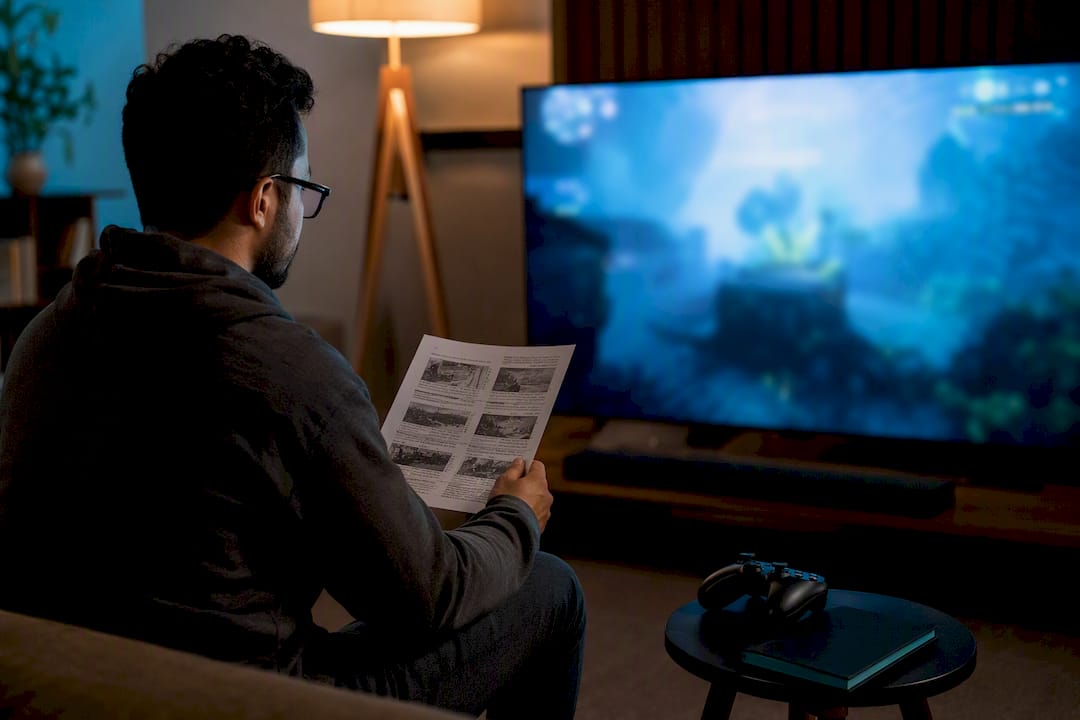
Run pseudo-localization before you send anything to a real translator. This technique artificially lengthens your placeholder text and swaps in accented or non-Latin characters to simulate what German or Japanese text will actually do to your UI. It exposes overflow, truncation, and encoding problems while you still have time to fix layout, not after a translator has already delivered 40,000 words into a UI that can’t hold them. Teams that adopt formal LocQA processes consistently report catching these issues earlier and cheaper than teams that skip straight to full translation.
The staged QA process that catches the most bugs:
- Pseudo-localize first. Confirm your UI survives text expansion of 30% to 40%, which is typical for German and several Romance languages.
- Check variable interpolation. Every sentence with a
{variable}needs testing in every language, since grammatical gender and word order can shift where the variable belongs. - Test gender and inflection edge cases. Languages like Russian and Polish inflect based on gender and case in ways English never signals, so a name-based sentence might need multiple translated versions.
- Review culturally sensitive content. Imagery, gestures, and even color symbolism carry different weight across markets; a quick culturalization pass avoids avoidable offense.
- Run a staged rollout. Ship to a small test region or crowdtest group on real devices before a full regional launch, since emulators and dev builds miss font rendering issues that show up on actual hardware.
Budget roughly 2 to 4 hours of QA time per 1,000 words of translated content for a careful in-context pass, more if your game has heavy UI density or branching dialogue. Automation helps most at the pseudo-localization stage, where tools can flag overflow and missing placeholders without a human reading every line first.
Pro Tip: Test your longest strings first. If “Are you sure you want to permanently delete this save file?” fits in German, shorter strings almost always will too.
How much time and budget should you set aside?
The pipeline has four stages regardless of team size: preparation (developer), translation (translator or tool), editing (a second linguist or reviewer), and LocQA (in-context testing, ideally by someone other than the translator).
Time estimates vary sharply by approach. A freelance translator working alone typically covers 2,000 to 3,000 words per day for straightforward UI and dialogue text. DIY with AI assistance moves faster on the first pass but needs proportionally more editing time to fix tone. A managed studio pipeline with dedicated translation memory tools can move faster on repeat projects because previously translated phrases get reused automatically.
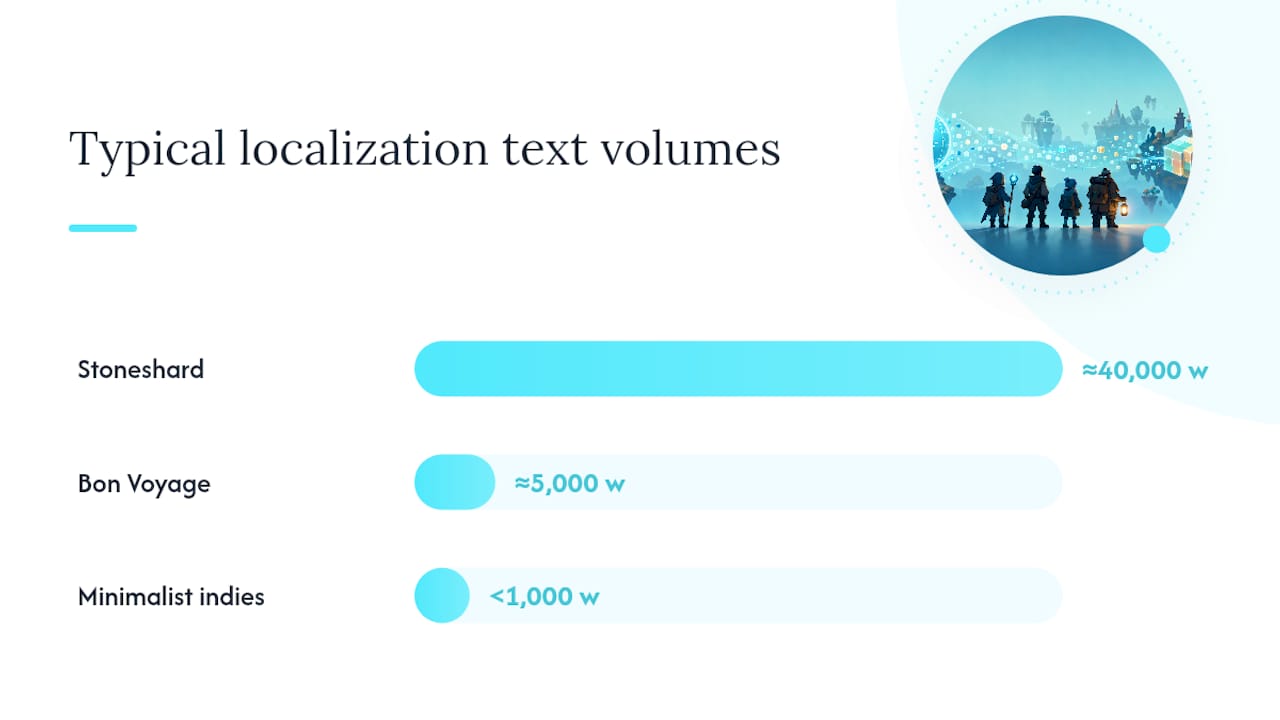
Text volume drives everything else. Developer-reported examples show the range clearly: a game like Stoneshard carried roughly 40,000 words of translatable content, while smaller titles like Bon Voyage sat closer to 5,000 words, and plenty of minimalist indies stay under 1,000 words entirely. A 1,000-word game might be fully translated and QA’d in a single week. A 40,000-word RPG can take months per language when you factor in editing and in-context review.
Budget guidance that holds up across most indie projects:
- A rough industry heuristic is allocating a modest share of total production budget to localization if you’re targeting multiple languages.
- Store-page-only localization for one language typically costs a few hundred dollars in freelance fees, a fraction of full in-game translation.
- Phase your rollout: test language first (validate demand), then full localization into your top two or three priority languages, then expand to additional markets once revenue data justifies it.
Phasing this way protects cash flow and lets real player data, not guesswork, decide where you expand next.
Where can indie developers find localization help and community support?
You don’t need a big budget to get started, and you don’t need to figure it out alone.
LocJam is the standout resource here. It’s a recurring community localization event built around noncommercial game translation challenges, and it does double duty: participants sharpen real localization skills, and organizers get community-driven translations plus visibility for the games involved. For an indie team weighing whether localization is even feasible, watching or entering a LocJam cycle is a low-risk way to see the process in action.
Beyond LocJam, a few other channels consistently produce useful help:
- itch.io community boards often have players willing to volunteer translation for games they genuinely enjoy.
- r/gamedev and genre-specific Discord servers are good places to post a translation request with clear scope and expectations.
- Open-source extraction tools exist for most major engines, though be careful with any game using anti-cheat or DRM systems, since some extraction methods can conflict with those protections.
- Engine documentation for Unity, Unreal, and Godot each maintain their own localization guides worth bookmarking before you start.
How does Arkian handle production for small teams without a TMS?
Most localization friction for small teams has nothing to do with translation quality. It’s the packaging, validation, and file management overhead that eats a week of engineering time nobody budgeted for.
Arkian’s platform automates that layer specifically. Instead of setting up a full translation management system or granting a vendor repository access, teams upload source content and get back structured, validated language packages ready to drop into a build. That includes multilingual scripts, TTS voice output, and metadata generation, all packaged with consistent folder structures rather than a pile of loose files someone has to sort manually.
Where this fits for indie teams specifically:
- Games with repeated content updates that need the same localization pipeline run again each patch, without rebuilding the process from scratch.
- Teams juggling multiple file formats (JSON, Android XML, iOS strings) who don’t want to manage format conversion by hand.
- Small studios with limited engineering bandwidth who need reviewable output, not a new tool to learn and maintain.
Arkian’s work with the Quiet Harbour app demonstrates the model in practice: a coherent localized experience across multiple languages, produced without the client managing translation infrastructure directly. For a team already stretched between coding, marketing, and support, a workflow that skips the TMS setup and hands back organized, structured language files is a meaningfully different starting point than the traditional agency model.
What matters most in indie localization decisions
The advice indie developers hear most often, translate everything into as many languages as you can afford, gets the priority backward. Text volume and narrative complexity should decide scope before language count does. A 40,000-word RPG that needs Japanese transcreation to land its tone is a different project than a puzzle game that needs five languages of button labels, and treating them the same wastes money in one direction and quality in the other.
The overrated step is full upfront translation before validating demand. The underrated step is the store-page test, because it costs almost nothing and answers the real question: does this market want the game at all? Skipping straight to full localization means finding out the hard way, after the invoice.
Where conventional advice actually falls short is the tooling gap between “hire a freelancer” and “adopt an enterprise TMS.” Most indie teams have no realistic use for the second option, but they also outgrow spreadsheets fast once they’re managing four languages and repeated updates. A lightweight automated production path, one that handles packaging, validation, and voice output without repository access or a steep learning curve, fits the actual size of most indie teams far better than either extreme.
Prioritize demand signals first, technical preparation second, and only then worry about which translation approach fits your narrative complexity.
— Arkian
Get your localization files production-ready with Arkian
Arkian is the alternative to setting up a full translation management system just to localize a small game: no repository access, no TMS onboarding, no manual file wrangling between formats. You upload your source strings, and the platform generates translated scripts, TTS voice files, and structured metadata packaged into ready-to-review language folders, whether you’re exporting JSON, iOS .strings, Android XML, or YAML.

That matters most for teams handling repeated updates or multiple file formats with no dedicated localization engineer on staff. Instead of rebuilding your export and QA process every patch cycle, you get consistent, reviewable output each time, which is exactly the gap between hiring a freelancer for a one-off job and paying for enterprise localization software neither fits a small team’s budget or workflow.
If your next step is a new language or your first store-page test, start by reviewing who Arkian is built for and see whether your file types and update cadence match the platform’s sweet spot before you commit engineering time to a manual pipeline.
Sources
- Is It a Good Idea to Localize an Indie Game?
- Indie Game Localization - SandVox
- LocJam
- XLOC localization/LocQA adoption insights