
One Manifest, Three Sizes: Localize Images for Small Teams
One Manifest, Three Sizes: Localize Images for Small Teams

Localizing images by locale means producing per-locale image and media packages, organized into locale folders with a manifest, through an automated pipeline that outputs delivery-ready assets. The fastest way to get there is to generate assets once from an approved source, run them through a repeatable transform pipeline, and package the output with checksums and version tags. Some platforms handle exactly this: automated generation, validation, and packaging without the need for repository access or a full translation management system.
TL;DR:
- Automated pipelines should generate, validate, and package locale-specific images from a single approved source to ensure consistency and efficiency.
- The folder structure typically includes a source folder and locale folders with a manifest that tracks file details, checksums, and source references.
- Using WebP as the primary format with PNG or JPEG fallback and three responsive sizes helps optimize file size and compatibility across devices.
- Automated quality checks confirm file existence, checksum integrity, correct dimensions, and proper language tagging, with cultural assets flagged for manual review.
- Delivery should utilize caching of small manifests at CDN edges and organize packages in storage prefixes to reduce load times and simplify staging or rollbacks.
Table of Contents
- How Do You Produce Per-Locale Image Packages?
- What Does a Locale Package Folder Structure Look Like?
- Which File Formats and Naming Conventions Should You Use?
- What Does an Automated Localization Pipeline Look Like?
- What Quality Checks Catch Broken Localized Assets?
- How Do You Deliver Locale Packages to Production?
- How Should You Handle Cultural Adaptation in Localized Images?
- How Do You Localize Text and Fonts Embedded in Images?
- Who Owns the Rights to Localized Image Assets?
- What Affects Delivery Performance for Localized Images?
- What Tools Handle Image Localization Well?
- When Should You Automate vs. Keep Manual Creative Review?
- Package Your Locale Images Without the Manual Grind
- Sources
- FAQ
How Do You Produce Per-Locale Image Packages?
Producing per-locale image packages starts with a single approved source asset per image, not a folder of loose exports someone edited by hand. From there, the workflow is mechanical, which is exactly why it should run on automation rather than a designer’s afternoon.
- Lock the source and the locale list. Pick one approved master per image or screen, and define your locale codes using BCP 47 conventions (
en-US,pt-BR,zh-Hant-TW). Sloppy locale tags are the number one cause of assets landing in the wrong folder later. - Run the transform steps. This covers text replacement inside layered source files, re-rendering or extracting flattened images, generating TTS narration where a screen has voice, and exporting responsive sizes (hero, medium, thumbnail).
- Bundle and generate the manifest. Every output file gets a checksum, a version tag, and a pointer back to its source master.
- Route through human review before release. Automated QA catches broken files and wrong locales; a person still needs to sign off on anything with embedded brand text or sensitive imagery.
The review step matters more than it sounds. Automation handles volume, but a five-second glance at a rendered screen catches font substitution glitches that no checksum will ever flag.
Pro Tip: Keep one master asset per screen and regenerate everything downstream. If you start editing locale-specific copies by hand, you lose the ability to regenerate cleanly when the source changes.
What Does a Locale Package Folder Structure Look Like?
A predictable folder layout is what lets both engineers and QA scripts find the right file without guessing. A typical root layout looks like this: a /source folder holding approved masters, then /locales/en-US/, /locales/es-MX/, /locales/ja-JP/, and so on, each containing its own images, audio, and a manifest.json.
The manifest is the part that actually does the work. It should carry the following fields:
| Field | Purpose |
|---|---|
file |
Relative path to the asset |
role |
hero, thumbnail, icon, sprite, narration, etc. |
resolution |
Pixel dimensions or audio sample rate |
checksum |
Integrity hash for validation |
derived_from |
Path or ID of the source master |
version |
Increment tied to the generation job |
Recording derived_from and generation parameters in the manifest means a team can re-run a specific transform deterministically instead of guessing which master produced which output, a pattern Arkian’s approved source to multilingual assets workflow builds around directly. Keeping every locale’s derived output inside one library rather than scattered across ad hoc folders also reduces the handoff steps that cause stale copies to sneak into production.
Which File Formats and Naming Conventions Should You Use?
Format choice determines both file size and where the asset can be safely used at runtime. Most locale packages need a small, consistent set of derivatives rather than a sprawling list of one-off exports.
- WebP as primary, PNG or JPEG as fallback. WebP typically cuts payload size significantly while PNG/JPEG covers older clients that don’t decode WebP.
- Three responsive sizes are usually enough. Hero, medium, and thumbnail renditions cover most product surfaces without generating transforms on the fly.
- Audio as MP3 for size, WAV when fidelity matters. TTS narration files should carry basic metadata: voice ID, sample rate, duration.
- Naming pattern:
screen-name_locale_role_resolution.ext, for exampleonboarding-hero_pt-BR_hero_1200x800.webporproduct-demo_ja-JP_narration.mp3.
Deterministic naming means your runtime code never has to parse a filename to guess what it contains. The manifest tells it, and the filename just has to be unique and human-readable.
What Does an Automated Localization Pipeline Look Like?
Automation only pays off when the pipeline has clear triggers and repeatable stages. Otherwise you’ve just moved the manual work one layer deeper.
Trigger models generally fall into three patterns:
- Approved-source push. A new master image lands in the source folder and kicks off generation for every configured locale.
- DAM upload. A digital asset management system fires a webhook when a new campaign asset is approved.
- Scheduled batch jobs. Nightly or weekly runs catch anything queued during the day and process it as one batch.
From there, the pipeline runs ingest, transform, validate, package, and publish as five distinct stages, each producing an artifact the next stage can inspect independently. Integration endpoints typically include S3 or another object store for raw output, a CDN in front of it for delivery, a CI job that triggers packaging on merge, and an API or CLI for teams that want to kick off a run manually. Provenance matters here too: every artifact should trace back to the job that generated it, which is what makes the checksum and version fields in the manifest useful rather than decorative.
Pro Tip: If your team ships weekly, tie the pipeline to your existing CI trigger instead of building a separate schedule. One less system to babysit.
What Quality Checks Catch Broken Localized Assets?
A locale package should never reach delivery without passing automated presence and integrity checks first. Skipping this step is how a team ends up shipping a screen with the wrong language audio attached to the right image.
- Confirm every file the manifest promises actually exists in the package.
- Verify checksums match, and confirm image dimensions against the expected role (a thumbnail should never be 4000 pixels wide).
- Check that TTS audio is in the correct target language and voice, not a leftover from a previous locale run.
- Flag anything with embedded text or culturally sensitive imagery for manual review rather than auto-approving it.
Mixing automated metadata checks with a human review step for brand-sensitive creative is the difference between catching a mislabeled file and catching a tone-deaf image before a user ever sees it. Automated checks are fast and cheap; they’re just not the whole job.
How Do You Deliver Locale Packages to Production?
Delivery comes down to where the files live and how the running app finds the right one without hardcoded logic. Most teams either use one storage prefix per locale inside a shared bucket, or separate buckets entirely; the prefix approach is usually simpler to manage at small scale.
- Store packages in S3 or an equivalent object store, fronted by a CDN for actual delivery to users.
- Let the client app read a small manifest first, then fetch only the asset it needs for the current locale and device, rather than embedding file paths directly in code.
- Cache the manifest at the CDN edge; since it’s tiny JSON, updating it is far cheaper than invalidating cached binary assets across every region.
- Roll out new locale packages in stages, using a canary locale first, and keep the previous manifest version on hand so a rollback is just a version pointer change.
Manifest-first lookup means the app never needs complex per-request branching logic. It reads a few kilobytes of JSON and picks the right file.
How Should You Handle Cultural Adaptation in Localized Images?
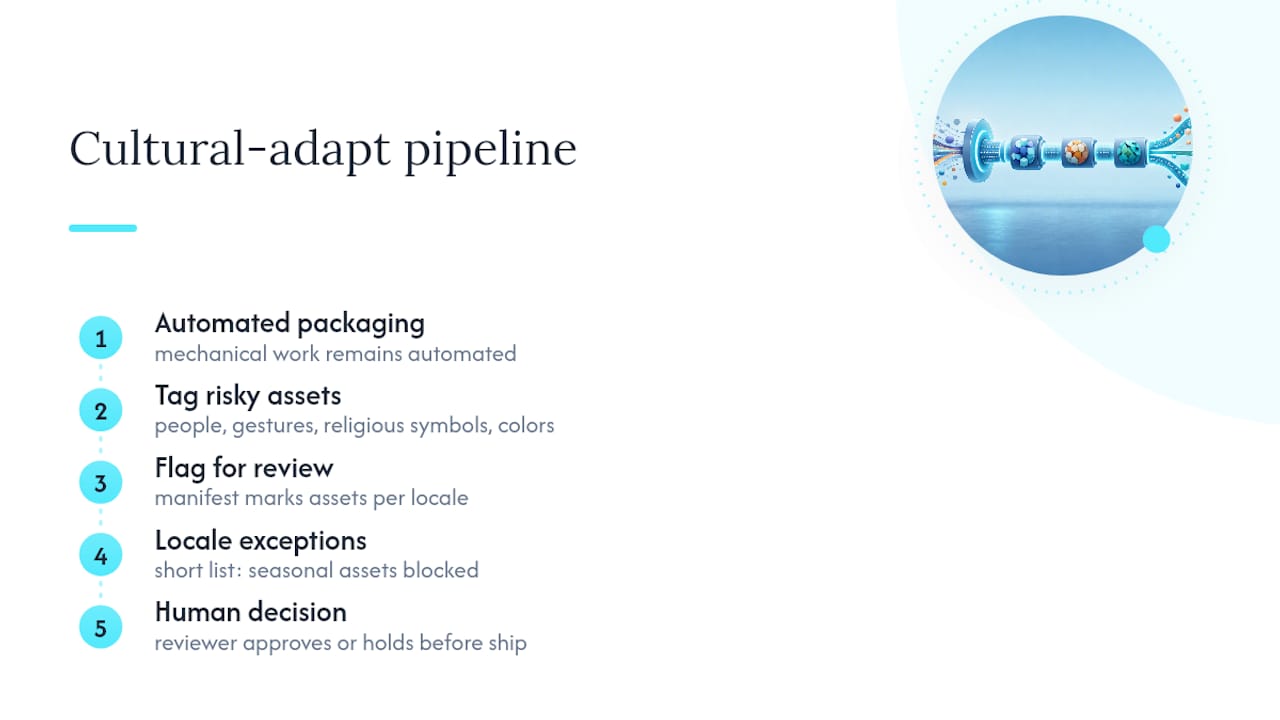
Cultural sensitivity in image packaging isn’t about redesigning creative for every market. It’s about flagging which assets carry cultural risk so a human sees them before release, while the mechanical packaging work stays automated.
Color, gesture, and symbolism carry different meanings across regions. A thumbs-up icon reads as approval in most of the U.S. but as an insult in parts of the Middle East. White carries mourning associations in several East Asian cultures where Western markets treat it as neutral or celebratory. These aren’t edge cases you can catch with a checksum. They need a reviewer who understands the target market.
The practical move for a production pipeline is tagging. Any asset containing people, hand gestures, religious symbols, or culturally coded colors gets flagged in the manifest for mandatory human review before it ships to that locale, rather than auto-approving because the file passed integrity checks. That tag becomes part of your workflow, not an afterthought someone remembers occasionally.
Holidays and imagery tied to specific calendars are the other recurring trap. A campaign built around a Western holiday season can look confusing or oddly timed in a market that doesn’t observe it. Building a short exception list into your pipeline, locales where a given seasonal asset simply shouldn’t ship, saves a support ticket and an awkward correction later. None of this requires redesigning the image itself in most cases. It requires deciding, upfront, which assets need eyes on them before they go out the door.
How Do You Localize Text and Fonts Embedded in Images?
Text baked into an image is the hardest part of any image localization pipeline, because you’re not translating a string, you’re regenerating a rendered graphic. If your source assets are layered files (PSD, Figma exports, SVG with live text layers), the transform step can swap the text and re-render cleanly. If the source is a flattened JPEG with text burned in, there’s no clean automated path. Someone has to recreate the layout by hand or the image gets rebuilt from scratch.

Font support is the quieter failure point. A font that handles English and Spanish fine may be missing glyphs for Vietnamese diacritics, Thai script, or Japanese kanji, which shows up as broken boxes or missing characters in the rendered output. Any pipeline generating text-in-image assets needs a font fallback chain defined per script, not per language, since several languages can share a script and its font requirements.
Text expansion is the other practical headache. German and Finnish strings routinely run 30 to 40 percent longer than their English source. A headline that fits neatly in an English hero banner can overflow, wrap awkwardly, or get truncated in a longer language, so your rendering step needs either dynamic text boxes or a manual layout check flagged for locales known to expand significantly. Right-to-left languages like Arabic and Hebrew add a further layer: the whole layout may need mirroring, not just the text direction, which is why RTL screens are one of the more common candidates for the human review gate rather than blind automation.
Who Owns the Rights to Localized Image Assets?
Licensing gets more complicated the moment an image gets duplicated across a dozen locale folders, because most stock and contributor licenses were written with one final image in mind, not twelve derived versions.
Stock photo and icon licenses typically cover a defined number of derivative uses or specific output formats. Generating fifteen locale variants from one licensed stock photo can quietly exceed what the license actually permits, especially with older per-seat or per-project licenses that predate automated localization pipelines. Before wiring stock assets into an automated pipeline, check whether the license covers unlimited derivative generation or caps it.
Voice talent for TTS narration raises a separate issue. Some voice licenses restrict use to specific markets or products, and a locale package that pulls in a licensed voice for a market it wasn’t cleared for creates real exposure, not just an inconvenience. This is worth checking before automation scales a single narration license across every locale you support.
The practical fix is recording licensing metadata alongside lineage in your manifest: source license ID, usage scope, and expiration date next to the derived_from field. That way a rights question doesn’t require someone digging through old purchase emails. It’s sitting right next to the asset it governs, and a scheduled audit of that metadata catches an expiring license before it becomes a takedown request.
What Affects Delivery Performance for Localized Images?
Package size compounds fast once you multiply one image by a dozen locales, several resolutions, and fallback formats. A pipeline that ignores this ends up shipping bloated packages that slow down the exact apps they’re supposed to serve.
Format choice is the biggest lever. WebP with PNG or JPEG fallback meaningfully reduces payload size compared to shipping JPEG or PNG everywhere by default, and that saving multiplies across every locale in your package. Generating a fixed set of responsive renditions upfront, rather than transforming images on the fly per request, is also generally cheaper to run and easier to cache for large catalogs.
Focal-point-aware cropping matters more than teams expect. A hero image cropped for a landscape banner in one market can cut off the subject entirely when reused for a square thumbnail in another, unless the export process accounts for focal point and aspect ratio at generation time rather than relying on a center crop.
CDN caching closes the loop. Since the manifest itself is small JSON, caching it aggressively and only invalidating specific binary assets when they actually change avoids the expensive alternative: purging cached images across every edge location on every release. That distinction between manifest-first and file-first invalidation is often the single biggest performance difference between a locale packaging system that scales and one that starts timing out under load.
What Tools Handle Image Localization Well?
Most teams stitch together some combination of a design tool for source assets, a scripting layer for transforms, and a manual packaging step, until the manual step becomes the bottleneck.
Design and rendering tools like Figma or layered PSD workflows handle the source-of-truth side, since they preserve editable text layers that automated re-rendering depends on. Image processing libraries such as Sharp or ImageMagick handle the resize, format conversion, and responsive export work at the transform stage. For TTS narration bundled alongside locale image packages, dedicated voice production tools reduce the coordination overhead of syncing narration timing to visuals across a dozen languages at once.
The gap most of these tools share is packaging and validation. A resizing library will happily generate a hundred image variants, but it won’t build you a manifest, verify checksums, or organize output into locale folders with version tags. That’s the layer purpose-built platforms close, generating multilingual scripts, TTS voice output, and structured language packages with validation and packaging handled inside the same pipeline, so teams aren’t gluing together five separate tools to get one delivery-ready folder.
When Should You Automate vs. Keep Manual Creative Review?
Automation wins on scale and speed for anything mechanical: resizing, format conversion, manifest generation, checksum validation. Keep humans in the loop for anything carrying brand voice, cultural symbolism, embedded hero text, or a hero campaign image, categories where a rendering error is invisible to a script but obvious to a person. The efficient pattern isn’t picking one over the other. It’s automating everything mechanical and routing only the flagged, high-risk assets to review, which is a model some packaging and validation approaches use.
— Arkian
Package Your Locale Images Without the Manual Grind
Some platforms help produce delivery-ready packages faster than stitching together a resizing script, a manual folder structure, and a spreadsheet to track which locale got which file. They automate parts that eat the most time in a manual workflow: generating multilingual scripts, TTS voice output, and structured multilingual outputs, then validating and packaging everything into a folder and manifest structure an app can consume directly.

You don’t need repository access or a translation management system to use it. Arkian is built specifically for small product teams and developers who need organized, reviewable output without the overhead of enterprise localization infrastructure. If you’re producing narrated demos alongside your image assets, the platform’s structured TTS production slots into the same package.
Start by reviewing the output folder structure and manifest format some platforms generate, then run a small job against one locale to see the packaged result before committing to a full rollout.
Sources
For deeper technical detail, see image performance optimization guidance and Arkian’s localization file format documentation.
FAQ
What Does “Localize Images by Locale” Actually Mean?
It means packaging per-locale image and media assets, organized into locale folders with a manifest, through an automated production pipeline rather than manually editing creative for each market.
Do I Need a Separate Manifest File for Each Locale?
Yes, each locale folder should have its own manifest.json listing its files, roles, resolutions, checksums, and the source master each asset was derived from.
What Image Formats Should a Locale Package Include?
WebP as the primary format with PNG or JPEG as fallback covers most use cases, alongside a small set of responsive sizes like hero, medium, and thumbnail.
How is locale image packaging handled?
Some platforms automate generation and validation, then package outputs into locale folders with a manifest, supporting formats like JSON, iOS strings, Android XML, YAML, and TTS audio without requiring repository access.
Should Every Localized Image Get Human Review?
No. Route only culturally sensitive assets, embedded text, and brand-critical creative to human review; mechanical resizing and format conversion can run fully automated.