
Stop Locale Breaks: Resource Bundle Localization for Small Teams
Stop Locale Breaks: Resource Bundle Localization for Small Teams

ResourceBundle is Java’s standard mechanism for keeping locale-specific text and objects out of your application logic, and the right implementation choice depends on what you’re storing. Use PropertyResourceBundle for plain string translations because translators can edit them without a rebuild, switch to ListResourceBundle when you need typed objects, and reach for ResourceBundle.Control (or ResourceBundleProvider in modular apps) the moment you need custom formats or remote loading.
TL;DR:
- Resource bundles should be organized in the same package path as the class files to avoid classpath issues during runtime.
- Picking
PropertyResourceBundlesuits most projects focusing on string translations, whileListResourceBundlebetter supports complex objects requiring recompile for changes.- The default bundle resolution process searches from the most specific locale to the base, repeating for the JVM’s default locale before failing; mismatched filenames or missing files cause
MissingResourceException.- Mixing
.classand.propertiesfiles for the same base name causes the class files to override properties, which can silently lead to outdated or missing translations.- Modern Java versions (9+) support UTF-8 in properties files by default, but build tools or older environments may need custom
ResourceBundle.Controlimplementations to ensure proper encoding.
Table of Contents
- What Is Resource Bundle Localization in Java?
- PropertyResourceBundle or ListResourceBundle: Which One Do You Need?
- How Does
getBundleResolve a Locale? - Why Do
.classFiles Override.propertiesFiles? - Does UTF-8 Actually Work in Modern Java Properties Files?
- Customizing Bundle Loading With
ResourceBundle.Control - Structuring Bundle Files So They Scale
- How Do You Debug a MissingResourceException?
- Code Examples for Common ResourceBundle Tasks
- Arkian’s Take on Operational Resource Bundle Management
- A Faster Path to Release-Ready Language Files
- Sources
What Is Resource Bundle Localization in Java?
Resource bundle localization means splitting locale-specific content into a family of files that share a base name, so your code calls the same method regardless of which language ends up on screen. The base bundle, something like MyResources, acts as the fallback. Locale-specific siblings like MyResources_de or MyResources_fr_CA override individual keys without touching the rest.
This base-name family model is the core of the ResourceBundle API, and it’s what makes the pattern durable across two decades of Java releases. You define keys once in the base file. Every locale-specific variant only needs to supply the keys that actually differ, and anything missing quietly falls back up the chain to the parent, then to the base.
That fallback behavior is convenient right up until it isn’t. If the base bundle itself is missing, or a key exists in no file in the entire chain, ResourceBundle throws a MissingResourceException at runtime rather than failing at compile time. This is the single most common bug reports Java teams file against their own localization setup: a typo in a key name, or a base file that got deleted during a repository cleanup, and suddenly a feature that worked in English breaks in production for German users only.
Oracle’s own internationalization guidance frames this separation as the whole point: locale-neutral code stays untouched while translators, or an automated pipeline, add new languages by dropping in new files. No recompilation, no code review for a Spanish rollout. That’s the promise. Whether you get it depends entirely on how disciplined your bundle organization is, which is where most teams start cutting corners.
PropertyResourceBundle or ListResourceBundle: Which One Do You Need?
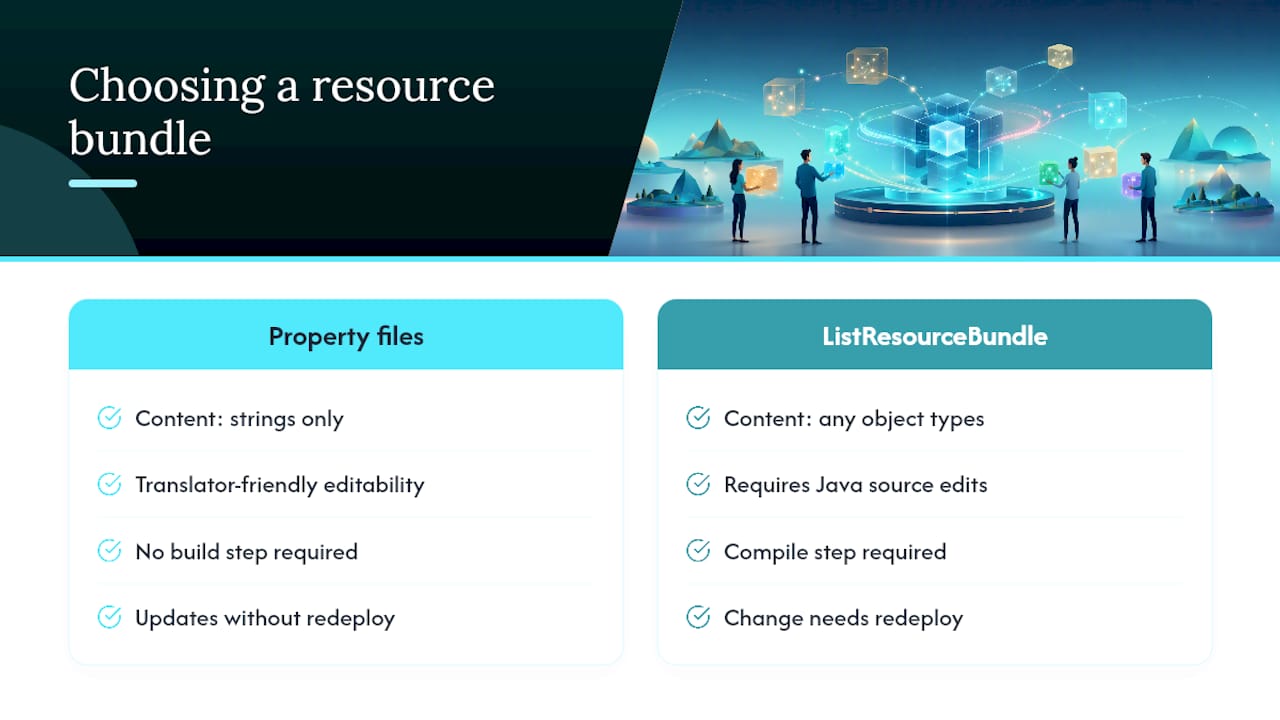
Pick PropertyResourceBundle when your content is strings and nothing else. Pick ListResourceBundle when a key needs to hold something a .properties file can’t express, like a formatted date pattern object, an array, or a custom class instance.
PropertyResourceBundle reads flat key-value text files. A translator, or a translation vendor, can open MyResources_ja.properties in any editor and ship it back without anyone touching Java source. That’s why it’s the default choice for UI strings, error messages, and anything a non-developer might need to edit. According to the Java Tutorials on resource bundle concepts, this is exactly the distinction Oracle draws: properties files trade flexibility for editability.
ListResourceBundle is a Java class. You define a getContents() method that returns key-object pairs, and because it’s compiled code, it can hold anything: a Map, a custom formatter, a nested object graph. The cost is that every change requires a recompile and a redeployment, which is a nontrivial workflow tax if your translation cycle runs faster than your release cycle.
For most small teams, the real decision isn’t technical, it’s operational. If translators are external and non-technical, properties files win by default because they don’t require a build step. If you’re localizing structured configuration rather than display text, a ListResourceBundle earns its complexity. Mixing both types in the same bundle family, though, introduces a precedence trap covered later, so decide per family and stay consistent.
How Does getBundle Resolve a Locale?
ResourceBundle.getBundle builds an ordered list of candidate names from the requested locale, walks it from most specific to least specific, and returns the first match it finds in any registered format. If nothing matches anywhere in that chain, including the base bundle, it throws MissingResourceException.
The candidate sequence for a locale like fr_CA with variant data typically looks like this, from most to least specific:
language_country_variant(e.g.,MyResources_fr_CA_POSIX)language_country(e.g.,MyResources_fr_CA)language(e.g.,MyResources_fr)- the base bundle name alone (
MyResources)
According to the ResourceBundle API documentation, this candidate generation runs first against the requested locale, and if nothing matches, it repeats the entire sequence against the JVM’s default locale before giving up. That second pass is easy to forget about, and it explains a class of bugs where a bundle “mysteriously” loads English content on a server configured with a different default locale than the one you tested locally.
Debugging a lookup failure starts with one question: which bundle actually got returned? Call .getLocale() on the result. If you requested Locale.of("pt", "BR") and getLocale() comes back with just pt, or worse, the root locale, you know the country-specific file either doesn’t exist or isn’t on the classpath where the loader expects it.
A few checks worth running before you assume the API is broken:
- Confirm the exact file name matches the base name plus the locale suffix, case-sensitive.
- Confirm the file sits in the same package (directory) as the base bundle, not a subfolder.
- Confirm the build actually copies
.propertiesfiles into the compiled output, since some build tools filter resources by extension.
MissingResourceException almost always means one of those three things went wrong, not that the API itself misbehaved.
Why Do .class Files Override .properties Files?
Bundle inheritance works differently depending on backing type, and mixing types inside one family is the fastest way to get a locale override that silently doesn’t apply. When both a .class and a .properties file exist for the same base name, the .class file takes precedence during lookup, according to Baeldung’s guide to ResourceBundle.
Property file inheritance walks the locale chain automatically. A key missing in MyResources_fr_CA.properties falls through to MyResources_fr.properties, then to the base. ListResourceBundle inheritance follows the same conceptual chain, but because it’s compiled code, the fallback only kicks in cleanly when every bundle in the chain is the same type.
The practical rule: never let a stale compiled ListResourceBundle class linger in your build output for a base name you’ve since migrated to properties. Build tools don’t always clean old .class files aggressively, and a forgotten compiled bundle from an earlier refactor will silently win over the properties file you’re actively editing, with no warning at all.
Does UTF-8 Actually Work in Modern Java Properties Files?
Yes, in current JDK distributions, but only if you’re on Java 9 or later and you’ve confirmed your specific build toolchain hasn’t overridden the default. Older Java versions read .properties files as ISO-8859-1 by default, which meant any non-Latin character had to be escaped using the native2ascii tool before it could ship.
That workaround was tedious and error-prone. A missed escape produced garbled text that only showed up when a native speaker actually looked at the running app. Java 9 and later read properties files as UTF-8 by default, according to the Java Tutorials, which removes the escaping step for the vast majority of new projects.
The catch: “modern JDK” doesn’t guarantee “modern behavior everywhere.” Some build plugins, legacy CI images, or third-party packaging tools still assume ISO-8859-1. If you’re supporting a legacy platform or ingesting translator-delivered files from an older tool, implement a custom Control that explicitly reads the byte stream as ISO-8859-1 and converts it, rather than assuming UTF-8 end to end. Verify, don’t assume.
Customizing Bundle Loading With ResourceBundle.Control
ResourceBundle.Control is the extension point that lets you break out of the default properties-or-class model entirely. Override getFormats(), getCandidateLocales(), newBundle(), or the cache timing methods, and you can load JSON, XML, or remote-stored translations through the exact same getBundle() call your application already uses.
This matters most for three scenarios:
- A JSON or XML bundle format that your translation pipeline already outputs, so you skip a conversion step.
- A UTF-8 properties loader for build environments that still default to a different encoding.
- Remote or HTTP-backed bundle retrieval, useful when translations live in a CMS rather than your repository.
The ResourceBundle API documents Control as the sanctioned way to do all three without forking the lookup logic yourself. If your application runs as a named module, though, Control isn’t the recommended path anymore. ResourceBundleProvider is the module-era replacement, designed to work with the module system’s stricter resource visibility rules instead of fighting them.
Pro Tip: Write your custom Control’s cache expiration deliberately. A Control that never expires its cache will keep serving a stale translation to every running instance until the next restart, which turns a one-line fix into a full redeploy.
Structuring Bundle Files So They Scale
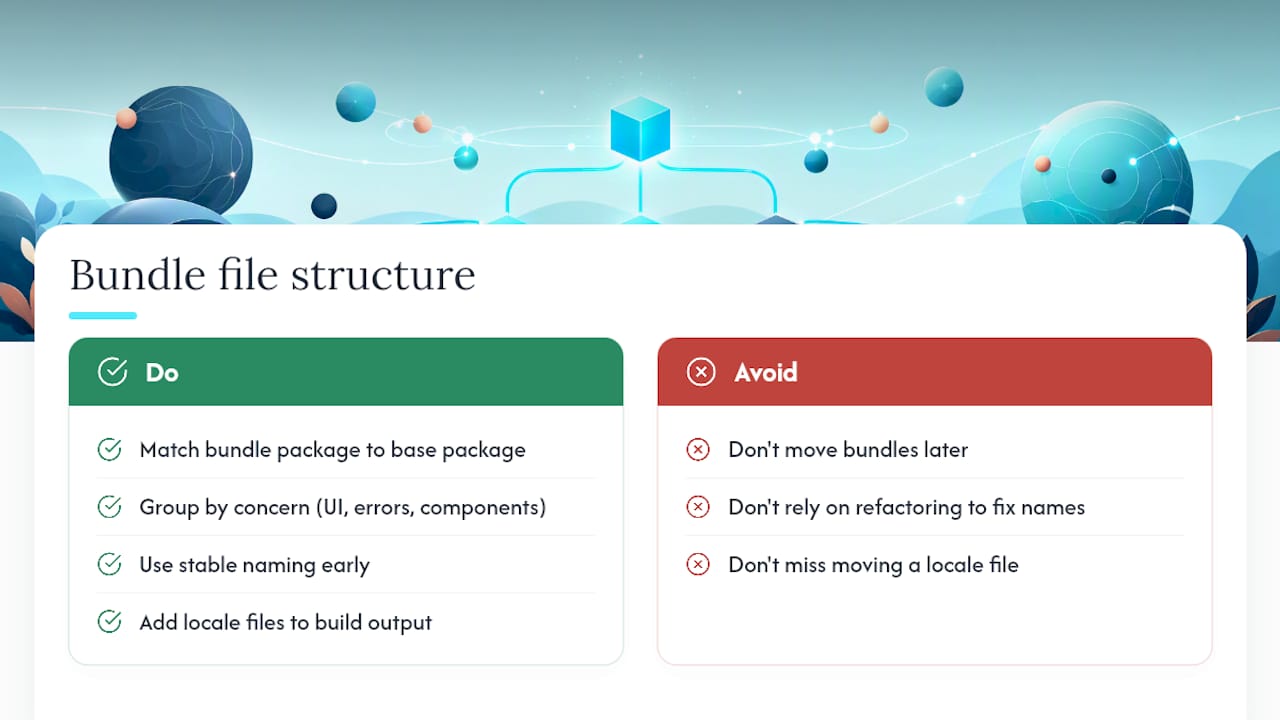
Directory structure decisions you make with three locales become expensive to unwind once you’re at twenty. Keep every bundle file’s package path identical to its base name’s package, exactly matching Java’s classpath lookup expectations, because the loader searches by package, not by convention.
Group files by concern rather than by arbitrary module boundaries. A messages family for UI strings, an exceptions family for error text, a widgets family for component labels, each with its own base name and its own locale variants, keeps a translator’s scope narrow and keeps merge conflicts rare when two engineers touch different features in the same sprint.
Baeldung’s ResourceBundle guide makes a point worth taking seriously: get the naming convention right early, because refactoring bundle placement after you’ve accumulated a dozen locales is disruptive in a way that refactoring almost anything else in a codebase isn’t. Every locale file has to move in lockstep, and a missed one produces a silent fallback to the wrong language rather than a build error.
For CI and deploy patterns, .properties files have a real operational advantage: you can add a new locale file to the build output without recompiling application code, which means a translation-only release can skip your normal build pipeline entirely if your deployment process supports selective file drops. Arkian’s guide to multilingual output folder structure covers one way to organize delivery-ready files so this stays simple as the number of locales grows, and the Android XML packaging reference walks through the platform-specific naming Android expects.
How Do You Debug a MissingResourceException?
Work through this checklist in order before you assume the code is broken:
- Confirm the base name matches exactly, including case, between your
getBundle()call and the actual file name on disk. - Confirm the package path. The bundle file needs to live in the same compiled package location the classpath lookup expects, not just “somewhere in the project.”
- Confirm the encoding. A file saved in the wrong encoding can pass a naive file-exists check while still failing key lookups for specific characters.
- Confirm the file is actually on the classpath at runtime, not just present in source control. Print
System.getProperty("java.class.path")if you’re unsure what the running JVM can see. - Bypass the cache during development.
ResourceBundlecaches loaded bundles by default, so a fix to a properties file won’t show up in a running dev server until you either restart or callResourceBundle.clearCache().
That fifth step trips up more developers than any API misunderstanding. You edit a .properties file, refresh the browser, and see no change, not because the fix is wrong, but because the JVM is still serving the cached bundle from three requests ago.
Code Examples for Common ResourceBundle Tasks
The pattern almost every localized app starts with:
ResourceBundle bundle = ResourceBundle.getBundle("MyResources", Locale.of("fr", "CA"));
try {
    String greeting = bundle.getString("greeting.hello");
} catch (MissingResourceException e) {
    // fall back to a safe default rather than crashing the request
    greeting = "Hello";
}
Confirming what actually loaded, which catches the “wrong locale returned” class of bug immediately:
System.out.println(bundle.getLocale());
// if this prints "fr" instead of "fr_CA", the country-specific file wasn't found
A minimal Control override for a UTF-8-explicit properties loader, useful when your build environment can’t be trusted to default correctly:
- Override
newBundle()to open the input stream with an explicitInputStreamReaderset toUTF-8. - Pass that reader into
new PropertyResourceBundle(reader)instead of the raw stream constructor. - Register the custom
Controlby passing it as the third argument togetBundle().
That’s the entire mechanism. It’s a small amount of code that removes an entire category of “why does this accented character look wrong in production” tickets.
Arkian’s Take on Operational Resource Bundle Management
Most of the friction in resource bundle work isn’t the API, it’s the handoff. An engineer extracts strings, a translator edits them somewhere else, and someone has to reassemble the result into the exact file structure the app expects without breaking a key somewhere in the chain. That reassembly step is where small teams lose the most time, because it’s manual and it’s exactly the kind of task nobody budgets for until a release slips.
A platform automates that packaging step directly by extracting strings, generating the translations, and validating keys before producing delivery-ready files. Output formats map to common deployment formats like JSON, Android XML, and iOS .strings, so the folder structure a developer expects to see is the folder structure that shows up. One example of this pattern is automated production feeding directly into an app’s existing localization structure, with validation catching key mismatches before they ever reached a build.
The lesson that generalizes: validation belongs before packaging, not after a bug report.
— Arkian
A Faster Path to Release-Ready Language Files
This platform gets you from source strings to packaged, delivery-ready language files without touching a translation management system or handing anyone repository access. If your team has been maintaining bundle families by hand, extracting keys, waiting on a translator, then reassembling everything into the right .properties or JSON structure, that whole cycle collapses into one automated pass.
The platform can handle string extraction, multilingual translation, structured packaging into formats like JSON, iOS .strings, or Android XML, and validation before anything ships, plus TTS voice output when a project needs narrated content alongside text. It fits a specific gap: small, fast-moving teams that need automated localization production but not a full TMS contract. If that’s where your project sits, check who it is built for and see whether your current bundle structure maps cleanly onto an automated production run.