
Ship Review Ready Packages With Translation Memory for Small Teams
Ship Review Ready Packages With Translation Memory for Small Teams

A translation memory ™ is a database that stores every sentence you translate alongside its original, then resurfaces that pair the moment similar text appears again. Use it whenever content repeats: software strings, updated manuals, product listings, anything released in versions. It works best paired with a CAT tool and, increasingly, with machine translation for the segments TM has never seen before.
TL;DR:
- Translation memory provides the greatest value for content that repeats frequently, like software strings, technical manuals, and product descriptions, rather than creative or branded content.
- Maintaining high match scores, especially 100% or in-context matches, significantly reduces review time and minimizes the risk of errors in repetitive projects.
- Proper TM setup involves consistent segmentation, carefully defined match thresholds, and restricted write access to ensure data integrity and maximize productivity gains.
- Regular maintenance, including deduplication and updating outdated entries, is critical to prevent poor suggestions that can slow down translation workflows.
- Using TM in conjunction with automation tools and review loops helps small teams deliver review-ready files efficiently without extensive TMS infrastructure.
Table of Contents
- How Does Translation Memory Usage Work in a CAT Tool?
- What Do Match Scores Like 100% and Fuzzy Mean?
- Which Content Types Benefit Most From TM?
- What Productivity Gains Does Translation Memory Deliver?
- What Are the Biggest Translation Memory Pitfalls?
- How Do You Set Up a Project to Get the Most From TM?
- How Should You Handle TMX Imports and Migrations?
- What Tools and File Formats Work With Translation Memory?
- How Does TM Fit Into Automated Localization Packaging?
- How Do You Train Translators to Use TM Effectively?
- What Are the Limits of Translation Memory?
- How Do You Measure TM’s Impact on Productivity?
- Arkian’s Take for Small Product Teams
- A Practical Next Step for Automating Localization Without Losing TM Discipline
- Sources
- FAQ
How Does Translation Memory Usage Work in a CAT Tool?
Every TM is built from translation units, which is just a technical name for a source sentence paired with its approved translation. When a translator works inside a CAT tool, the software breaks the document into segments, usually one sentence, heading, or list item at a time, and checks each one against the TM before the translator even starts typing.
That checking step depends entirely on segmentation. If your source document splits a sentence differently than it did last time (a stray line break, a merged bullet, a reformatted table cell), the TM might miss a match it should have caught. Consistent segmentation rules, ideally the same rules across every project in a workflow, are what keep match rates high over time. Translation memories store these segments as source-target pairs, which is what makes retrieval fast even across TMs holding hundreds of thousands of entries.
The in-editor experience follows a predictable loop:
- The CAT tool scans the incoming segment and searches the TM for equivalents.
- It surfaces the closest match, ranked by similarity score, directly in the editor pane.
- The translator accepts the suggestion as-is, edits it, or writes a fresh translation.
- Once confirmed, that segment gets written back into the TM, ready for the next repetition.
That feedback loop is the entire mechanism behind translation memory usage. It’s not a static glossary; it grows with every project, which is exactly why maintenance (covered later) matters so much.
What Do Match Scores Like 100% and Fuzzy Mean?
Not every TM suggestion deserves the same trust, and knowing the difference saves real review time.
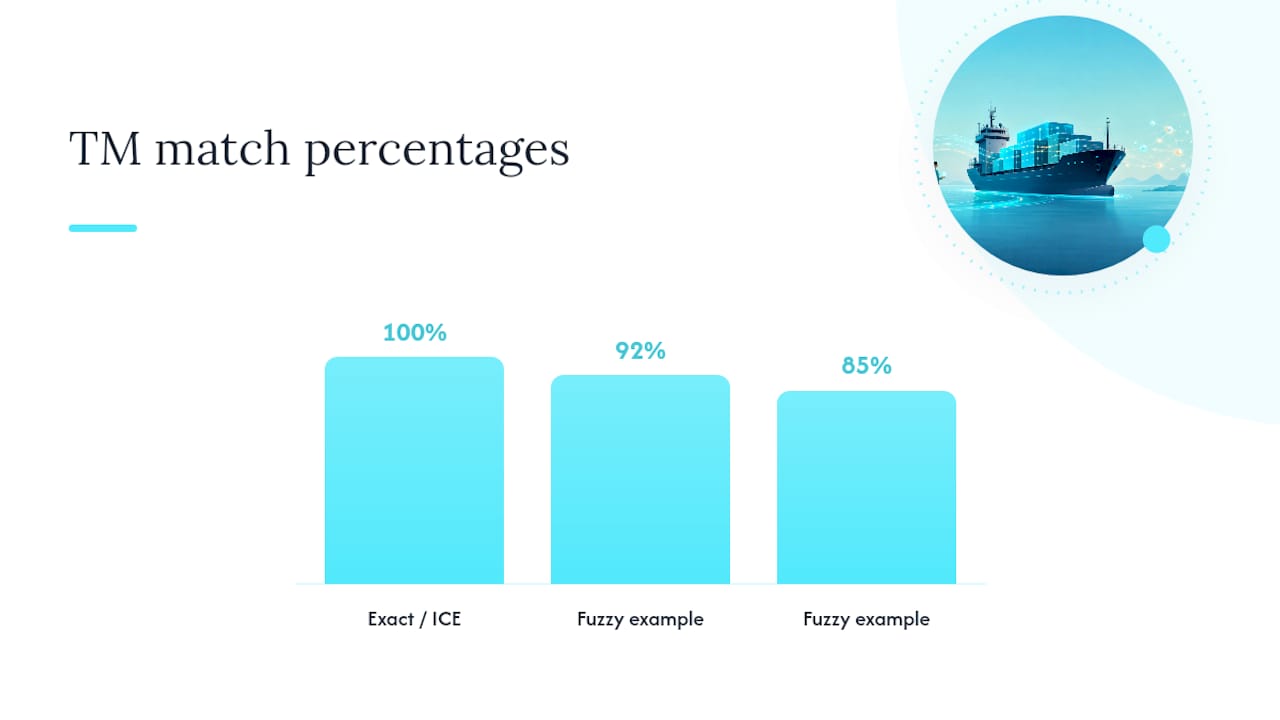
An exact match, often labeled 100%, means the incoming segment is character-for-character identical to one already stored. An in-context exact match (ICE) goes further: it confirms the surrounding segments match too, meaning the sentence appears in the same position and context as before. ICE matches are safe to auto-apply in most workflows since context mismatches (a phrase that means something different depending on what precedes it) are exactly what causes silent errors.
Fuzzy matches are anything below 100%, typically shown as a percentage like 85% or 92%. These need a human eye.
- 100% / ICE matches: safe for automated reuse in most cases, still worth spot-checking in regulated or legal content.
- Fuzzy matches (typically 50 to 99%): always route to a human reviewer.
- Concordance search: lets a translator search the entire TM for a specific word or phrase, even when no full-segment match exists, which is invaluable for staying consistent on terminology across a project.
Concordance searches matter even in less repetitive text, since they let translators confirm how a term or idiom was rendered previously without hunting through old files by hand.
Which Content Types Benefit Most From TM?
TM isn’t equally useful everywhere. It earns its keep fastest on content that repeats, either literally or structurally, and offers less on content built to sound different every time.
The strongest candidates:
- User interface strings and app labels, which recur across screens and app versions.
- Software and localization keys, where the same error message or button label shows up in dozens of files.
- Technical manuals and documentation, especially when only a few paragraphs change between versions.
- Product catalogs, where specifications and boilerplate descriptions repeat across SKUs.
- Legal and compliance templates, where wording needs to stay identical for consistency and liability reasons.
Translation memory delivers the most value on repetitive content like technical manuals, software strings, and product documentation, and that value compounds across versioned releases.
Creative copy, marketing taglines, and brand storytelling behave differently. Sentences are built to feel fresh, so exact-match reuse is rare. Even here, though, concordance search helps translators check how a brand phrase or recurring motif was handled before, keeping voice consistent without forcing identical wording.
What Productivity Gains Does Translation Memory Deliver?
The evidence is consistent even if the range is wide: implementing TM systems can lift translator productivity by roughly 10% to 60%, depending on how repetitive the content is and how large and well-maintained the TM already is.
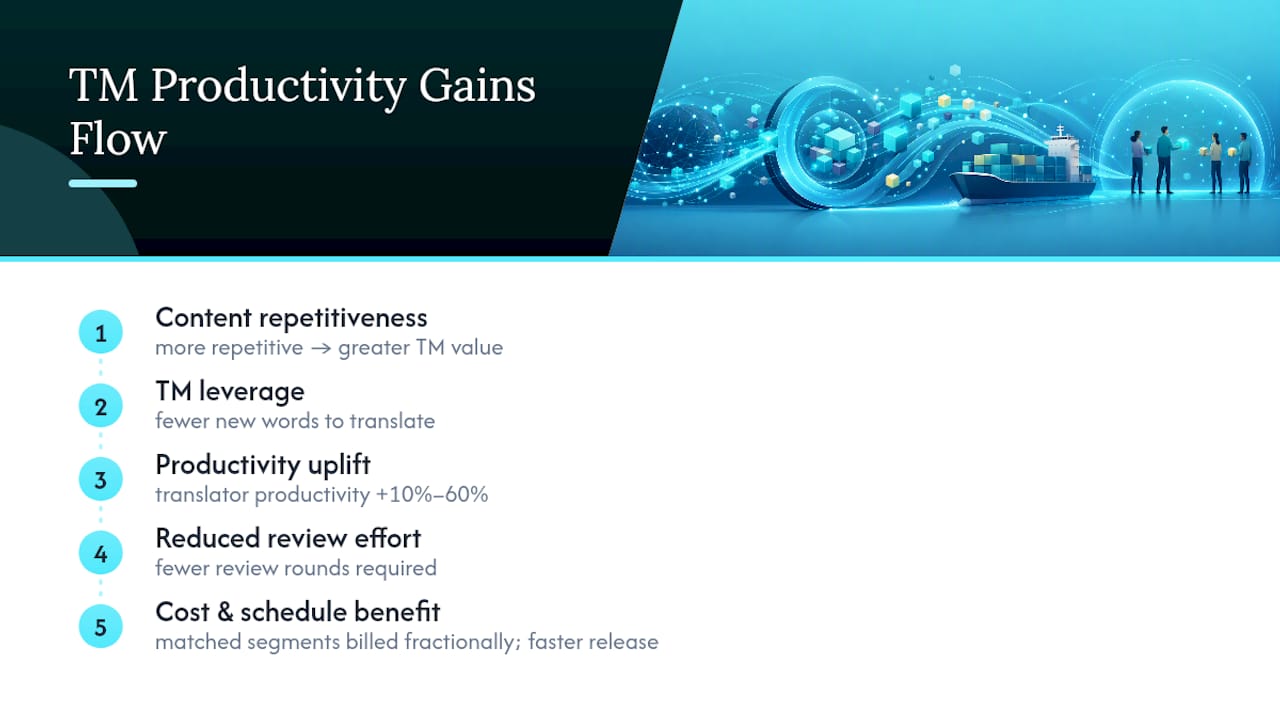
A project full of original marketing copy sits near the low end, since TM has little to offer beyond concordance lookups.
Fewer new words means fewer hours of translation and fewer rounds of review. Teams that track cost per word typically see leveraged (matched) segments billed at a fraction of the rate for fresh translation, since the work involved is verification, not creation. Over a multi-language release cycle, that difference is often the gap between shipping on schedule and slipping a release by weeks.
What Are the Biggest Translation Memory Pitfalls?
TM only helps if what’s inside it is trustworthy. A TM stuffed with inconsistent, outdated, or poorly segmented entries actively hurts a project, since translators start seeing (and sometimes accepting) bad suggestions faster than they can catch them. This is the garbage-in-garbage-out problem, and it’s the single most common reason teams sour on TM after early enthusiasm.
Typical harmful entries include: a segment translated two different ways in two different projects, a segment that used an old product name before a rebrand, or a segment with mismatched punctuation that throws off future match scoring.
A practical maintenance checklist, roughly in order of priority:
- Deduplicate identical source segments that have drifted into different translations over time.
- Remove outdated entries, especially anything tied to a discontinued feature, old branding, or a legal term that’s since changed.
- Normalize punctuation and spacing so segments that are functionally identical don’t score as fuzzy matches due to a trailing space or a curly versus straight quote.
- Fix segmentation inconsistencies, particularly around bullet points and table cells, which are the most common source of mismatched boundaries.
- Audit for terminology drift, where the same source term picked up two different approved translations across projects.
On governance, restrict TM write access to reviewed, approved translators rather than leaving it open to anyone touching a project. Schedule audits on a recurring basis, and where possible, use automated scripts to catch punctuation and markup mismatches rather than relying on someone noticing by eye.
Pro Tip: Keep a lightweight change log next to your TM, even just a spreadsheet noting when and why a segment was edited. It saves enormous time when a reviewer asks “why does this say X now?” six months later.
How Do You Set Up a Project to Get the Most From TM?
Getting real value out of translation memory usage comes down to a handful of configuration decisions made before translation starts, not fixes applied after the fact.
- Select your TM target and priority order. If a project draws from multiple TMs (a general one and a product-specific one), rank which one wins when both offer a match.
- Set match thresholds deliberately. Decide the percentage below which a suggestion requires mandatory human review rather than letting a translator skip past a borderline 88% match.
- Define who can write to the TM. Not every contributor should have update rights; reserve that for reviewed, approved translators.
- Decide on pre-translation policy. Auto-applying 100% and ICE matches before a human ever opens the file saves time, but locking those segments so they can’t be silently altered protects consistency.
- Link a termbase. Pairing TM with a terminology database catches inconsistent word choice that segment-level matching alone won’t flag.
- Build a reviewer loop. Every corrected fuzzy match should flow back into the TM, not just into the delivered file, or the same fix gets made repeatedly on future projects.
Tool documentation for setting match-percentage thresholds typically lets teams auto-apply 100% matches while forcing manual confirmation below a chosen cutoff in the moderate range.
Pro Tip: *Set your fuzzy-match review threshold higher than feels necessary at first.
How Should You Handle TMX Imports and Migrations?
TMX exists precisely so a TM built in one tool isn’t trapped there. As the standard interchange format, it lets teams move translation memories between platforms without starting from zero, which matters anytime a team switches tools or merges TMs from an acquisition or agency handoff.
Before a full import, run through a short checklist:
- Clean segments of stray formatting tags and markup left over from the source tool.
- Normalize character encoding, since mismatches here are a common cause of garbled text after migration.
- Import a small sample first and check segmentation and formatting before committing the full file.
- Confirm TM priority order if you’re merging the incoming TMX with an existing memory, so the right source wins on overlapping segments.
Converting legacy translations to TMX and validating with a sample import before the full migration catches most encoding and segmentation problems while they’re still cheap to fix.
What Tools and File Formats Work With Translation Memory?
TM lives across three broad tool categories: desktop CAT editors for individual translators, cloud-based translation management systems for team collaboration, and API-driven connectors that plug TM into a larger pipeline without a human opening a dedicated editor at all.
Integration points typically include content management systems, source control repositories, continuous integration pipelines, and dedicated review tools where stakeholders approve strings before release.
On the file side, expect to work with:
- TMX for portable, tool-agnostic translation memory exchange.
- XLIFF for the actual translatable content passed between systems.
- JSON and other i18n formats common in web and app development.
- Android XML and iOS .strings for native mobile localization.
Knowing which formats a workflow needs to support before choosing tools avoids a painful re-architecture later.
How Does TM Fit Into Automated Localization Packaging?
For small teams without a dedicated localization engineer, the real bottleneck usually isn’t translation quality. It’s turning translated segments into delivery-ready files without manual file wrangling.
Some platforms apply TM-style consistency logic during automated production, then package the result directly into formats like Android XML, iOS .strings, JSON, and TS, ready for review rather than requiring a separate export step. Automation handles the repetitive, high-confidence matches; gating still applies wherever content needs a human sign-off before release.
- Automated suggestion and packaging removes manual file handling for small teams without full TMS infrastructure.
- Review-ready output means validation happens before delivery, not after a broken build.
- The Quiet Harbour app collaboration shows this packaging approach applied to a real multilingual product release.
How Do You Train Translators to Use TM Effectively?
A translator who’s never worked with TM before will either trust it too much or ignore it entirely, and both mistakes cost time.
The most useful onboarding habit is walking new translators through real fuzzy matches from a live project, not hypothetical examples. That contrast teaches judgment faster than any style guide.
Teams should also set expectations early about TM write access. A new translator shouldn’t be pushing unreviewed segments into a shared memory on day one, since a single bad entry can propagate across every future project that draws from that TM. Pair new translators with a reviewer for their first few projects specifically to catch this.
Finally, cover the termbase alongside the TM. Translators who skip the terminology database and rely on memory alone tend to introduce the exact inconsistency TM is supposed to prevent. A short reference sheet showing where the termbase overrides a TM suggestion, and why, heads off a lot of avoidable rework.
What Are the Limits of Translation Memory?
TM is powerful, but it doesn’t solve everything, and pretending otherwise causes real problems.
It struggles with context sensitivity. ICE matching reduces this risk but doesn’t eliminate it.
It also can’t handle genuinely creative or brand-voice content well. Marketing copy, taglines, and anything meant to feel fresh resists reuse by design, which limits TM’s productivity impact on that content type even though concordance search still helps with terminology consistency.
There’s a scaling tension too: larger TMs increase leverage but also raise maintenance costs, since more entries mean more opportunities for drift, duplication, and outdated wording to accumulate. A TM that’s never pruned eventually slows reviewers down more than it speeds them up.
Finally, TM alone doesn’t replace human judgment on tone, cultural nuance, or evolving terminology. It’s a memory, not an editor. Large language models and machine translation still lack the brand-specific context a TM encodes unless that memory is fed into the pipeline explicitly, which is exactly why TM and MT increasingly work side by side rather than one replacing the other.
How Do You Measure TM’s Impact on Productivity?
The clearest metric is leverage rate: the percentage of a project’s total word count that comes from TM matches rather than fresh translation.
Turnaround time per project, tracked over successive releases of the same product, tends to show the clearest real-world signal: a manual that took two weeks to translate the first time often takes a fraction of that on the third revision, purely from accumulated TM leverage.
Most agencies and platforms bill leveraged content at a reduced rate precisely because the work involved is lighter, so tracking the blended rate across a project reveals whether TM adoption is actually paying off or whether poor TM hygiene is forcing translators to redo fuzzy matches from scratch anyway.
Arkian’s Take for Small Product Teams
Automation should apply TM logic wherever confidence is high and step back the moment it isn’t. Arkian’s approach leans on automated matching for repetitive strings while keeping validation in the loop before anything ships, because consistency without review is just a faster way to spread errors. Choose manual TM curation when content carries legal, brand, or contextual weight; let automation carry the repetitive volume.
— Arkian
A Practical Next Step for Automating Localization Without Losing TM Discipline
There are solutions that give small teams a way to keep translation memory discipline without needing a full translation management system or repository access to run it. These platforms automate the repetitive parts (string translation, TTS voice output, structured metadata) while still packaging everything into review-ready files, so consistency doesn’t depend on someone manually cross-checking every segment.

If your team is juggling Android XML, iOS .strings, JSON, or YAML files across multiple languages, Arkian’s localization strings production handles the packaging step that usually eats the most time. Teams building voice or narration assets alongside text can look at Arkian’s multilingual voice production for the same review-ready approach applied to audio. Check who Arkian is built for to see whether your team’s workflow fits, then start a project to see your first package come out review-ready.
Sources
- Monterey Institute research quoted in Yamada (implementation impact on translator productivity)
- Translation memory — Wikipedia
- What Is Translation Memory Management & Why Do You Need It? — Smartcat blog
FAQ
What Is the Purpose of a Translation Memory?
A translation memory stores previously translated sentences as source-target pairs so translators can reuse them instead of retranslating identical or similar content, which improves both speed and consistency across a project.
How Long Does It Take to Translate 20,000 Words?
It depends heavily on TM leverage and content repetition. A project with high TM matches can move significantly faster than a fully original document, since productivity gains of 10 to 60% directly cut the effective new-word count a translator has to handle.
What Does ﷽ Translate Into English?
That symbol represents a religious invocation phrase used in Arabic script and doesn’t have a single standard English translation; it’s typically rendered descriptively rather than word-for-word in professional localization contexts.
What Is the Purpose of Translation Memory in CAT Tools?
Inside a CAT tool, translation memory automatically checks each incoming segment against stored translations and surfaces matches ranked by similarity, letting translators accept, edit, or reject a suggestion instead of starting from a blank page every time.
When Should You Use TM Instead of Relying Only on Machine Translation?
Use TM whenever consistency with prior approved wording matters, such as UI strings, legal templates, or versioned documentation, since machine translation alone doesn’t know your brand’s previously approved phrasing unless that memory feeds into the pipeline directly.