
Developer Friendly Localization: CI/CD Playbook From Arkian
Developer Friendly Localization: CI/CD Playbook From Arkian

Developer-friendly localization means your engineers keep control of source files, translations flow through automation instead of manual handoffs, and every output arrives build-ready, validated, and correctly formatted for the target platform. It does not mean handing a translation agency your entire repository or babysitting spreadsheets before every release. Platforms exist specifically for this workflow, producing packaged, checked language files without demanding repo access. The sections below walk through the concrete mechanics: what to automate, what to validate, and how to judge whether a tool actually respects your pipeline.
TL;DR:
- Automated validation in CI ensures placeholder integrity, ICU plural rule compliance, and correct string length before packaging and deployment.
- Localization workflows should prioritize local extraction and Git-first sync methods that limit repository access and prevent security risks.
- File format support must include JSON, iOS, Android, ARB, PO, YAML, and TypeScript to avoid mangling nested structures or ICU syntax.
- Packaging should generate build-ready output structured into platform-specific folders, with clear source-to-output mapping documented for version control.
- Most teams can implement a reliable, automation-driven localization pipeline in a few days, avoiding manual fixes and reducing release delays.
Table of Contents
- What Features Make a Localization Platform Developer Friendly?
- Keeping Source Control and Repositories Under Developer Control
- Automating a Build-Ready, Validated Localization Pipeline
- How Do You Improve Translation Quality Without Slowing Down Releases?
- Which File Formats and Integrations Actually Matter?
- How Do You Evaluate a Localization Workflow, Not Just a Feature List?
- How Arkian Puts Developer-Friendly Localization Into Practice
- Why Most “Developer Friendly” Claims Don’t Hold Up
- Try Arkian for Your Next Localization Release
- Sources
- FAQ
What Features Make a Localization Platform Developer Friendly?
A platform earns the “developer friendly” label by fitting into tools engineers already use, not by asking them to learn a new content management system. That starts with a command-line interface for scripted extraction and upload, a REST API for custom automation, and webhooks that fire when translations are ready for pull. Git integration matters more than almost anything else on this list: if a tool cannot open a pull request with updated strings, someone is copying files by hand, and that person will eventually make a mistake.
Local scanning versus forced repository upload is the fork in the road that separates engineering-first tools from repackaged translation management systems (TMS). Scanning source files locally and sending only the extracted strings, rather than the whole codebase, cuts exposure and keeps proprietary logic off third-party servers.
The other non-negotiables:
- Validation in CI, including placeholder preservation, so
{username}doesn’t get mangled intousernamein the Portuguese file. - ICU-compliant plural handling, since English’s two plural forms turn into six in Polish and one in Japanese, and getting this wrong breaks strings silently.
- Translation memory and glossaries, which prevent the word “cancel” from being translated four different ways across one app.
- Context tools, like screenshots and inline developer comments, so translators aren’t guessing what a two-word button label actually does.
- Runtime delivery choices, meaning you can bake translations into the build or fetch them from a content delivery network (CDN) depending on how often you ship.
The ICU project documents the formatting and pluralization standards most serious platforms build against, and it’s worth knowing that standard even if you never touch ICU syntax directly, because it’s what your validation layer should be checking.
Keeping Source Control and Repositories Under Developer Control
The safest localization workflows never ask for a copy of your Git history. They ask for the strings, not the source.
- Extract locally first. Run a CLI scan against your source directory so only the strings that need translation leave your machine or your CI runner, not the surrounding business logic.
- Use Git-first sync. A tool that opens a pull request with new or updated translations lets a human reviewer approve changes the same way they’d review any other code change, instead of trusting an opaque dashboard.
- Reject full-repo uploads when a token-scoped alternative exists. CLI-based extraction or a CI runner upload limited to specific paths accomplishes the same sync without granting broad read access to your entire codebase.
- Wire extraction into pre-commit hooks or build scripts. Catching a missing translation key before it merges is far cheaper than catching it after a customer reports broken UI in Spanish.
- Audit what actually gets sent. If a vendor’s onboarding call insists on an OAuth app with write access to every repository in your organization, that’s a signal to keep shopping.
Teams that skip step three learn the hard way. A common failure mode: a startup grants a translation vendor full repo access “temporarily” to speed up onboarding, forgets to revoke it, and six months later that token is still live with access to unrelated private repositories. SimpleLocalize’s developer documentation makes the same point from the tooling side: engineers gravitate toward CLI and Git-first workflows precisely because they automate sync without handing over the keys to everything.
Automating a Build-Ready, Validated Localization Pipeline
Automation only earns its name when the output needs zero manual cleanup before it ships. The sequence that works looks like this: a CI job detects new or changed source strings on merge, pushes them to a translation queue, and a separate publish job compiles the finished translations into environment-tagged packages, a pattern echoed in SimpleLocalize’s developer workflow guidance. Two distinct jobs, not one, because detection and publishing run on different clocks. You want the first firing constantly and the second firing only when translations are actually complete.
Validation is where most homegrown pipelines fall apart. At minimum, CI should check:
- Placeholder integrity across every locale (no orphaned
%sor mismatched brace counts) - ICU plural rule compliance for languages with more than two plural categories
- String length and encoding, since German strings routinely run 30% longer than English and can overflow fixed-width UI elements
- Folder and file structure against the target platform’s expected schema before packaging
Packaging then organizes validated output into per-locale folders matching your app’s expected structure, ready to commit or push to a CDN.
Pro Tip: Bake translations into the build for apps that release weekly or less often; fetch from a CDN if you ship multiple times a day and can’t wait for a full app store review cycle to fix a bad string.
Rollback matters here too. Keep staging and production publish jobs separate, so a broken translation catches in QA rather than in a live release, and can be reverted independently of your code deploy.
How Do You Improve Translation Quality Without Slowing Down Releases?
Bad translations rarely come from bad translators. They come from translators working blind, with no idea what a string does or where it appears. Three cues fix most of that: screenshots showing the string in context, the component path so a translator can trace button.confirm back to an actual button, and a one-line developer comment explaining any ambiguity (“this is a verb, not a noun”). Apple’s own WWDC guidance on localization-friendly layouts makes the case that previewing UI during development, not after, is what actually prevents rework, and the same logic applies to giving translators visual context up front rather than after the fact.
Beyond context, four systems cut rework further:
- Translation memory reuses prior translations for repeated or similar strings, so you’re not paying to retranslate “Save Changes” for the tenth time.
- Glossaries lock product-critical terms (brand names, feature names, legal terms) to one approved translation across every language.
- Pseudo-localization stress-tests your UI with fake expanded strings before real translations arrive, catching layout breaks early.
- Machine translation plus human post-edit works well for high-volume, low-risk strings, but should stay off anything customer-facing in legal or medical contexts without a human review pass.
Which File Formats and Integrations Actually Matter?
Format fidelity is where a lot of “supports everything” claims quietly fall apart. A converter that flattens nested JSON or drops ICU plural syntax turns a five-minute export into a two-day debugging session.
The formats worth demanding native support for: JSON in both nested and flat structures, iOS .strings and .stringsdict, Android XML, ARB, PO, YAML, and TypeScript language files. Each has its own escaping rules, plural syntax, and nesting conventions, and a platform that treats them as interchangeable text files will eventually mangle one of them.
-
Fidelity matters because ICU placeholders, plural categories, and printf-style format strings don’t survive a naive text-to-text conversion.
-
IDE and framework plugins for VS Code, IntelliJ, and frameworks like Next.js cut the context-switching that comes from tabbing between an editor and a separate translation dashboard, a pattern documented in next-intl’s Next.js integration guide.
-
Libraries like Lingui show what good extraction and compile-time validation looks like for JavaScript projects specifically, catching missing keys before they ship rather than after.
-
Write a custom conversion script only as a stopgap. If you’re maintaining more than one, it’s usually cheaper to switch platforms than keep patching format drift.
Guides on handling JSON language files, iOS .strings files, Android XML strings, and TypeScript language files each cover the platform-specific quirks that a generic converter tends to miss.
How Do You Evaluate a Localization Workflow, Not Just a Feature List?
Feature lists are marketing. Workflows are what actually ship code. Before adopting a platform or overhauling an internal process, run it through these questions:
- Does extraction happen locally, and can you verify what data actually leaves your infrastructure? Ask for the exact data flow, not a summary.
- Does it hook into your existing CI/CD pipeline, or does it require a separate manual trigger? A tool that only works via web dashboard clicks isn’t automation.
- What validation runs automatically, and what fails the build versus what just warns? Placeholder mismatches should fail; minor length overages might just warn.
- How is packaging handled, and does the output match your existing folder structure without a custom script?
- What are the rollback and environment separation guarantees? Staging and production should never share a publish path.
- What’s the realistic integration timeline? Most teams can wire a CLI-based tool into an existing CI/CD pipeline within a few days; anything promising same-day “zero config” magic for a complex monorepo deserves skepticism.
- What’s the runtime cost? A CDN-fetched translation payload adds latency and a cache invalidation problem every time you publish, worth weighing against a baked-in catalog that ships with the build but requires a full redeploy to update.
Ask any vendor these questions directly. If the answers are vague on data flow or repo access, that vagueness is itself the answer.
How Arkian Puts Developer-Friendly Localization Into Practice
One approach follows the same logic laid out above: extraction happens without requiring full repository access, validation runs before packaging, and the output arrives structured for immediate use rather than requiring cleanup. That’s the whole point of a production platform built for small teams instead of an enterprise TMS.
Concretely, that shows up as:
- Format-specific handling guides for iOS strings, Android XML, JSON, TypeScript files, and YAML, each written around that format’s actual quirks instead of a one-size-fits-all converter.
- Packaging into a defined multilingual output folder structure so files drop into place without a custom integration script.
- Real-world delivery evidence through a collaboration with an app, where localized strings, structured metadata, and voice output were packaged into a coherent multilingual release without requiring full source access.
- Approved source to multilingual assets documentation showing exactly how source files map to delivered packages, version to version.
None of that requires opening your repository to a third party. That distinction is the entire premise behind Arkian’s design.
Why Most “Developer Friendly” Claims Don’t Hold Up
Most localization vendors call themselves developer friendly because they have a CLI. That’s the bare minimum, not the bar. A CLI that dumps a full-repo scan into someone else’s cloud isn’t developer friendly; it’s a repo-upload workflow with a nicer command line wrapped around it.
The conventional advice in this space fixates on feature checklists: how many file formats, how many languages, how many integrations. That’s the wrong axis. The right question is where your source data goes and whether the output needs manual fixing before it ships. A platform that handles twelve formats but requires a human to fix placeholder mismatches after every release isn’t automated. It’s just delayed manual work with extra steps.
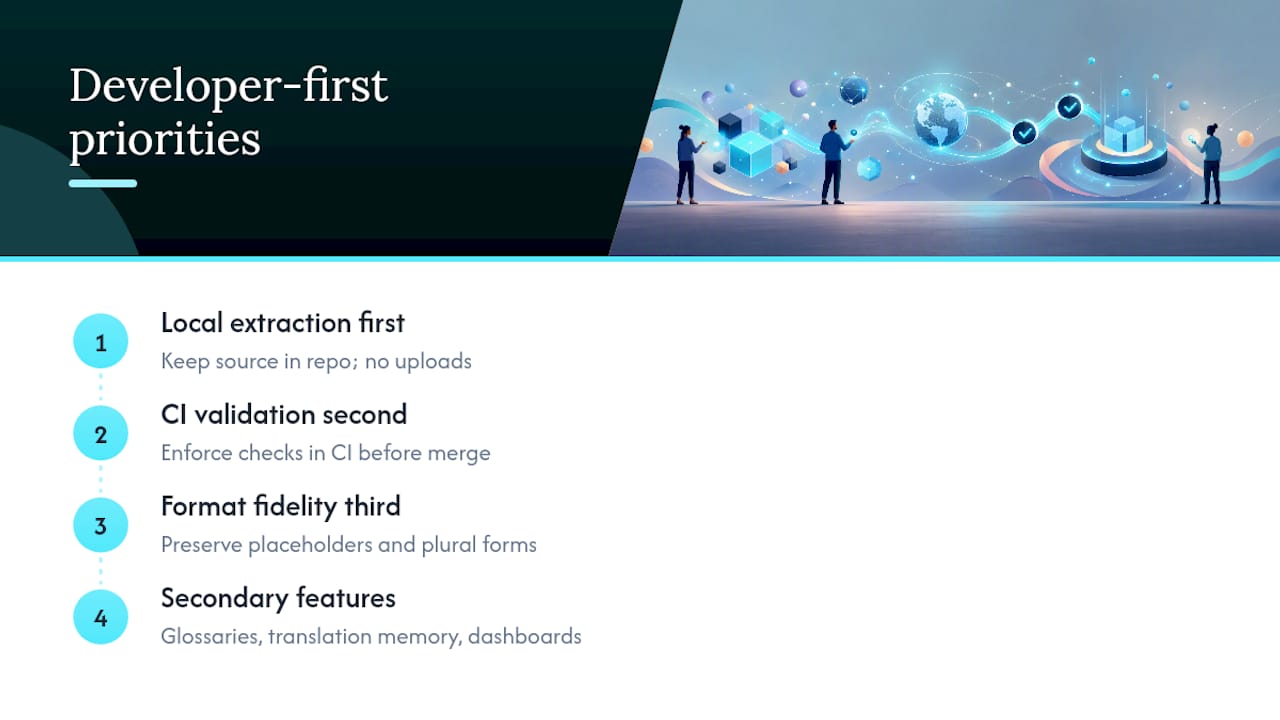
What the evidence in this piece actually supports is a narrower priority list: local extraction first, CI-enforced validation second, format fidelity third. Everything else, glossaries, translation memory, dashboards, is genuinely useful but secondary. Teams that get the first three right rarely need to think hard about the rest. Teams that skip them end up debugging broken plurals in production, wondering why their “developer friendly” tool needed a manual patch three releases in a row.
— Arkian
Try Arkian for Your Next Localization Release
The platform is designed for small product teams and developers who want translated, validated, build-ready language files without opening their repository to a translation vendor or standing up a full TMS. No forced repo uploads, no manual reformatting after delivery, just structured JSON, iOS, Android, TypeScript, or YAML packages that drop straight into your release pipeline.

If you’re evaluating whether Arkian fits your stack, start with the format guide closest to your project, whether that’s Android XML strings or JSON files, and see how the packaged output matches your existing folder conventions. From there, check who Arkian is built for and run a sample localization job against a real branch to see the validated output before you commit to changing your workflow.
FAQ
What Does “Developer Friendly Localization” Mean?
It means source files, repository access, and release timing stay under the engineering team’s control, while translation and validation run through automation instead of manual handoffs. The output arrives build-ready, meaning no reformatting is needed before deployment.
Do Localization Tools Need Full Repository Access?
No. Tools built for engineering teams extract strings locally or through a token-scoped CI upload, which avoids exposing your full codebase. Some tools produce validated language packages without requiring full repo access.
How Do I Handle ICU Plural Rules Correctly?
Use a validation layer that checks plural categories against the ICU pluralization standard for each target locale, since some languages need up to six plural forms. Skipping this check is one of the most common causes of silently broken strings in production.
How Long Does It Take to Add Localization to a CI/CD Pipeline?
Most teams can integrate a CLI-based extraction and validation step into an existing pipeline within a few days, assuming the source strings are already reasonably organized. Complex monorepos with fragmented string locations typically take longer due to extraction mapping, not tooling limitations.