
Ship Without Rework: I18n vs L10n PRD Checklist for Small Teams
Ship Without Rework: I18n vs L10n PRD Checklist for Small Teams

Internationalization (i18n) is the engineering work that makes a product capable of running in any language or region. Localization (l10n) is the market-specific translation and cultural adaptation applied on top of that foundation. Engineering owns i18n; localization teams, product managers, and marketing own l10n. Skip the first, and the second gets slower, buggier, and far more expensive.
TL;DR:
- Implementing proper architecture for i18n reduces rework by supporting string externalization, Unicode, flexible layouts, and locale-based formatting from the start.
- Localization requires translating strings, adjusting formats, imagery, and tone for each market, with repeated processes for every supported language after the initial setup.
- Small teams benefit from automating string packaging and review processes to minimize coordination friction and avoid manual, error-prone steps.
- Proper testing distinguishes between automated i18n checks, like pseudo-localization, and human-dependent l10n QA to prevent layout and linguistic regressions.
- Following authoritative sources and establishing a strong i18n foundation and glossary significantly lowers long-term costs and quality issues in global product rollout.
Table of Contents
- What Is the Difference Between Internationalization and Localization?
- What Technical Components Does Internationalization Require?
- How Does the Localization Process Actually Work?
- I18n vs L10n: Who Owns What and When?
- What Should Be on an I18n and L10n Checklist?
- How Do You Test I18n and L10n Separately?
- How Can Small Teams Implement This Without a Full TMS?
- Where Should You Go for Authoritative I18n and L10n Guidance?
- A Practical Take on Sequencing I18n and L10n for Small Teams
- How Arkian Handles Multilingual Packaging for Small Teams
- Sources
What Is the Difference Between Internationalization and Localization?
I18n is architecture. It means designing your codebase so that no engineering change is required to support a new language or region, according to Wikipedia’s overview of internationalization and localization. That means pulling every user-facing string out of your code, building in Unicode support, and making your layouts flexible enough to survive text that runs 30% longer in German or right-to-left in Arabic.
L10n is the repeated, market-specific work built on that foundation. It’s translation, but it’s also currency formatting, date formats, legal disclaimers, color choices, and imagery that make sense in a given culture. The W3C frames i18n as the enabling work and l10n as what happens on top of it, market by market.
A quick before-and-after makes the split obvious:
- Before i18n:
"Welcome back, " + userName + "! You have " + count + " new messages." - After i18n: A resource entry like
welcome_messagewith named placeholders ({userName},{count}) and separate plural rules per locale.
The first version breaks the moment you try to translate it into a language with different word order or plural grammar. The second survives it. A few concrete examples show where each discipline lives:
- I18n example: Storing all UI text in a
strings.jsonfile instead of hard-coding it inline, so a French or Japanese version needs zero code changes. - L10n example: Translating that
strings.jsoninto French, then adjusting date format fromMM/DD/YYYYtoDD/MM/YYYYand currency from$to€. - RTL example: An app built for English only breaks when you add Arabic, because the layout assumes left-to-right text flow, icon placement, and even scroll direction, requiring both an i18n fix (mirroring layout logic) and l10n content (right-to-left translated copy).
What Technical Components Does Internationalization Require?
Internationalization isn’t a checkbox you tick once. It’s a set of specific code and architecture decisions that either save you months later or cost you months later, depending on whether you make them now. Microsoft’s globalization guidance is blunt about this: plan for it early, because retrofitting i18n into a shipped product is far more expensive than building it in from the start.
Here’s what actually needs to happen in the codebase:
- Externalize every UI string. Move text out of source code and into resource files, whether that’s JSON,
.stringsfor iOS, XML for Android, or PO/XLIFF files. Use named placeholders like{userName}instead of string concatenation. - Standardize on UTF-8. Unicode is the baseline for handling scripts beyond basic Latin characters. Watch for legacy systems still running on older encodings like Latin1 or Shift-JIS, since mixing them silently corrupts text.
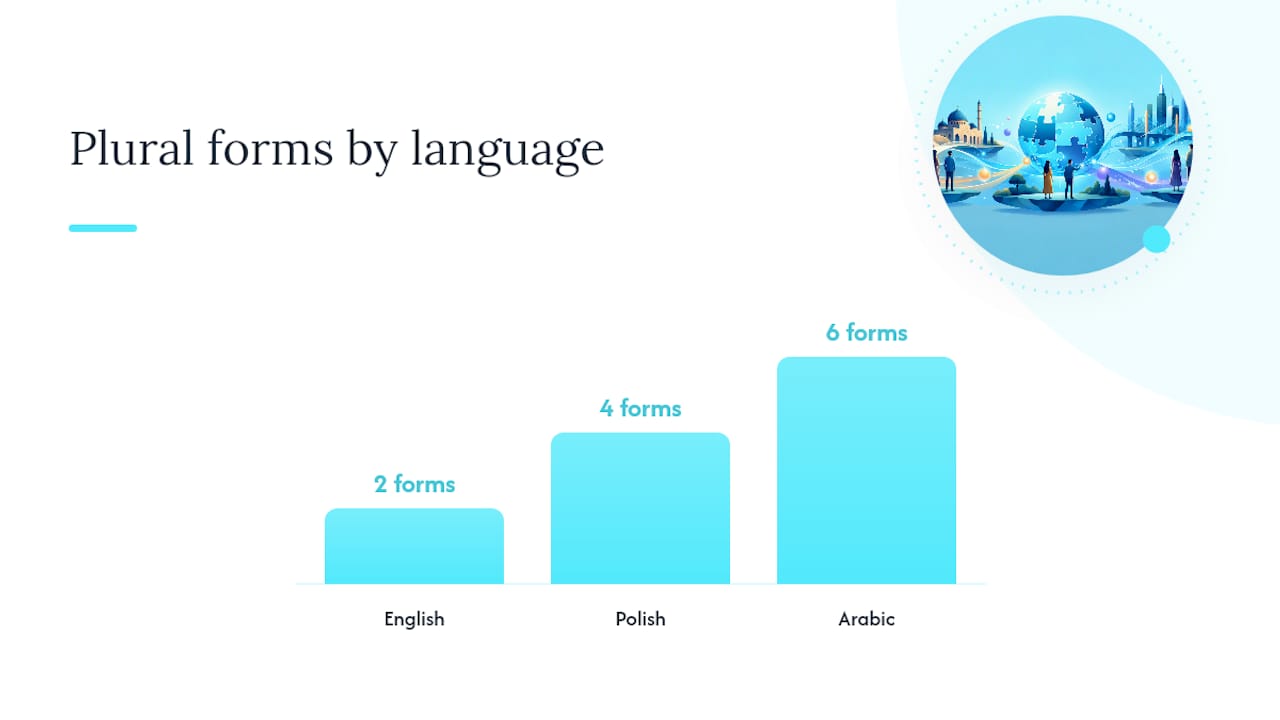
- Integrate ICU or an equivalent formatting library for plural rules, date formats, and number formatting. English has two plural forms; Polish has four; Arabic has six. Hardcoding “if count == 1” logic breaks the moment you leave English.
- Build flexible layouts. Avoid concatenating text fragments across UI elements, plan for text expansion (German and Finnish routinely run 30 to 40% longer than English), and add RTL and CJK (Chinese/Japanese/Korean) rendering support before you need it, not after.
- Add hooks for locale packs, feature flags, and fallback behavior, so a missing translation degrades gracefully to a default locale instead of showing a raw key or blank string.
Named placeholders matter more than they sound like they should. Complete-sentence variables reduce translator errors and let translators rearrange word order to fit target-language grammar, something concatenated string fragments make nearly impossible, per Microsoft’s localization guidance.
Pro Tip: Run your UI through a pseudo-localization pass before you write a single line of translated copy. Replace every string with an artificially expanded, accented version and see what breaks. It catches truncated buttons and hardcoded widths in minutes instead of after a translator flags them.
How Does the Localization Process Actually Work?
Once the architecture is in place, localization runs as a repeatable pipeline: extract strings, route them through a translation management system or machine translation engine, apply human post-editing and linguistic quality assurance, run an engineering review, and release. Skip a step and it usually surfaces later as a support ticket in a language nobody on the team reads.
Localization isn’t one task. It splits into distinct types depending on what’s being adapted:
- Software/app localization — UI strings, error messages, in-app notifications.
- Website localization — page content, SEO metadata, legal footers, region-specific navigation.
- Marketing localization — campaigns, ad copy, imagery that needs cultural review, not just translation.
- Product/packaging localization — labeling, compliance text, measurement units.
- Game localization — dialogue, subtitles, voiceover, and often entire narrative adjustments for cultural fit.
Each type needs its own artifacts to run efficiently: a shared glossary so “cancel” doesn’t get translated three different ways across your product, a style guide covering tone and formality, screenshots or in-context previews so translators aren’t working blind, and a pseudo-localization pass to catch layout problems early.
On tooling, most teams lean on a translation management system or CAT (computer-assisted translation) tool, paired with automation hooks that push and pull strings automatically. Wiring that into CI/CD rather than batching translations manually cuts time-to-market meaningfully for products that ship updates often, according to Phrase’s comparison of internationalization and localization. For teams weighing how localization fits into a broader global rollout, the cost logic mirrors what’s already established in multi-platform SEO planning: build the foundation once, then deploy it repeatedly across markets instead of rebuilding per region.
I18n vs L10n: Who Owns What and When?
Here’s the version you can paste directly into a planning doc or PRD:
- Internationalization (before launch, owned by engineering): externalize strings, adopt UTF-8, add ICU/plural support, build flexible layouts, support RTL/CJK rendering, add locale-pack loading hooks.
- Localization (per market, owned by localization/product/marketing): translate strings, adapt currency and date formats, adjust imagery and tone, handle legal and regulatory copy, run linguistic QA.
- Sequence rule: i18n comes first and happens once. L10n comes after and repeats for every new market.
- Deferrable: full translation of low-traffic markets, voice/audio localization, marketing asset localization for regions without active campaigns.
- Not deferrable: Unicode support, string externalization, and layout flexibility. Retrofitting these after launch means touching code you already shipped.
Effort versus impact breaks down predictably: i18n is a fixed, front-loaded engineering cost that pays off across every future market. L10n is a recurring, market-by-market cost that scales with how many languages you support and how often your product changes. Teams that get the sequence backward, translating first and fixing architecture later, end up paying for both twice.
What Should Be on an I18n and L10n Checklist?
A working checklist splits cleanly into three buckets: what engineering does before anyone translates a word, what localization needs to work efficiently, and what process guardrails prevent regressions.
Engineering, before localization starts:
- Externalize all strings into resource files with named placeholders.
- Standardize encoding on UTF-8 across every layer, including databases and APIs.
- Integrate ICU or a comparable library for plural, date, and number formatting.
- Build layouts that tolerate 30 to 40% text expansion and support RTL/CJK rendering.
- Add fallback logic for missing translation keys.
Localization readiness:
- Build and maintain a glossary of core product terms before translation begins.
- Provide screenshots or in-context previews for every string batch sent to translators.
- Write a style guide covering tone, formality, and brand voice per market.
- Run in-context review with a native speaker before release, not just a translator sign-off.
Process guardrails:
- Set up continuous localization tied to your CI/CD pipeline instead of batching translations manually.
- Run pseudo-localization on every new feature before real translation begins.
- Gate releases on linguistic QA passing, the same way you’d gate on unit tests passing.
Prioritizing i18n architecture and building a glossary early are the two investments that pay off disproportionately for small teams, according to RewriteBar’s 2026 localization best practices.
Pro Tip: Treat your glossary as a living document, not a one-time deliverable. Every time a translator asks “how should I handle this term,” the answer goes in the glossary immediately, not in a Slack thread that disappears in a week.
How Do You Test I18n and L10n Separately?
I18n testing and l10n testing catch different failure modes, and conflating them wastes effort on both sides. I18n testing is largely automatable: pseudo-localization catches truncated buttons and hardcoded widths, while unit and integration tests catch encoding failures and broken plural logic before a human ever sees the string.
L10n QA is inherently human-in-the-loop. It covers linguistic accuracy, tone consistency against the style guide, and visual regression testing on RTL and CJK layouts where text direction or character width can silently break a design. Screenshot-based review catches what automated tests miss: a button that technically fits the string but looks cramped, or a translated headline that overflows its container.
Pseudo-localization and automated tests are consistently flagged as effective early-detection methods for layout and encoding issues, catching problems before they reach human translators, per RewriteBar’s best-practices guidance.
Where these tests live matters as much as what they test:
- Put pseudo-localization and encoding checks in your CI pipeline, gating merges the same way you’d gate on failing unit tests.
- Put linguistic QA and visual regression review in a separate gate before release, owned by localization, not engineering.
- Route failures to whoever owns the layer that broke: engineering fixes layout and encoding bugs, localization fixes translation and tone issues.
One more wrinkle worth flagging: AI-driven features increasingly need per-language QA criteria, since language models produce noticeably different output quality across languages, a gap that generic QA checklists don’t catch.
How Can Small Teams Implement This Without a Full TMS?
Small teams don’t need a full translation management system to do this correctly. They need the right minimal i18n changes and a way to hand off review-ready files without engineering babysitting every export.
The minimum viable i18n work is short: externalize strings into a resource file format your platform supports, add named placeholders everywhere you currently concatenate text, and wire in locale-aware date and currency formatting. That’s it. It’s not a rewrite, it’s a discipline.
From there, the bottleneck usually isn’t translation quality, it’s coordination. Someone has to extract strings, route them, get them translated, repackage them into the exact file format the app expects, and hand them back for review without breaking anything. Automating that packaging step, producing review-ready .strings, Android XML, JSON, or YAML files directly, removes a meaningful chunk of the coordination cost between engineering and whoever is reviewing the translated output.
- Before: engineer exports strings, emails a spreadsheet, waits for a translator, manually rebuilds the resource file, hopes nothing broke.
- After: reviewer receives a structured, delivery-ready file already formatted for the target platform, with no repository access required.
The real cost in small-team localization usually isn’t translation, it’s the friction of getting translated text back into a shippable file format without a round trip through engineering.
This approach is demonstrated by examples of structured multilingual output handed to reviewers in a format ready to check, not a raw text dump requiring rework.
Where Should You Go for Authoritative I18n and L10n Guidance?
When you’re writing a spec or making an architecture decision, go to primary sources instead of secondhand summaries:
- W3C’s internationalization guidance for the canonical definition of i18n and its relationship to l10n.
- Microsoft’s globalization and localization documentation for concrete engineering recommendations and early-planning arguments.
- The Unicode Consortium for encoding and script standards.
- Libraries worth evaluating: ICU for locale-aware formatting, i18next for JavaScript projects, and gettext for PO-based translation workflows.
Cite these directly in your spec rather than paraphrasing secondhand blog summaries. It saves an argument later about whether a formatting rule is actually a standard or just a convention someone assumed.
A Practical Take on Sequencing I18n and L10n for Small Teams
The mistake I see repeated across small product teams isn’t a lack of ambition about going global. It’s sequencing the work backward: translating a hardcoded UI first, then discovering the layout can’t handle German text expansion or Arabic script direction, and rebuilding half the front end to fix it.
Get the architecture right first. Externalize strings, standardize on UTF-8, wire in ICU-based plural handling. That work happens once. Everything after it, translating into a fifth or tenth language, is comparatively cheap.
The two investments that pay off disproportionately for a small team are a clean i18n foundation and a glossary that keeps terminology consistent across every language you ship. Skip either one, and you’ll pay for it in rework, not savings.
Continuous localization tied to your release cycle, plus a simple linguistic QA gate, prevents most of the regressions that turn “we shipped in three languages” into “we shipped three sets of bugs.” It’s not glamorous work. It’s just the difference between a product that scales globally and one that breaks every time it tries.
— Arkian
How Arkian Handles Multilingual Packaging for Small Teams
Once your i18n architecture is solid, the remaining bottleneck is almost always packaging and handoff, not translation quality itself. Arkian automates that step: it generates multilingual scripts, voice (TTS) output, and structured metadata, then packages everything into review-ready files, iOS .strings, Android XML, JSON, or YAML, without requiring repository access or a full translation management system.

That matters most for small teams where the same two or three people handle engineering, review, and release. Instead of exporting strings, waiting on a translator, and manually rebuilding files by hand, reviewers get structured, delivery-ready packages they can check directly against the supported file formats their platform expects. If you’re a small team trying to figure out whether Arkian fits your workflow, start by checking who Arkian is built for and see how the packaging step maps onto your next release cycle.
Sources
- Localization vs. Internationalization (W3C)
- Localize software - Microsoft Learn
- Internationalization vs Localization (Phrase)
- Internationalization and localization — Wikipedia