
5 Deliverables That Ship Your Language Switcher Design for Small Teams
5 Deliverables That Ship Your Language Switcher Design for Small Teams

Enabling language switching means producing five things: locale manifest entries, complete per-platform resource files, a packaged folder per locale, a metadata.json for each package, and (if you’re using voice) TTS audio assets. Skip any one, and the switcher looks fine until Android’s LocaleConfig or iOS’s defaultLocalization catches the gap. Get all five right and the app switches at runtime and shows up correctly in system-level per-app language settings.
TL;DR:
- Supporting language switching requires managing multiple files, metadata, and voice assets, with all elements correctly aligned for runtime system recognition.
- Incomplete or mismatched resource files across platforms can cause silent failures, rendering the switcher ineffective despite proper UI.
- A single canonical resource source, validated with pseudolocalization and automated checks, prevents drift and missing keys from causing runtime issues.
- Embedding all locales during build simplifies deployment but can slow updates; serving locales on demand allows faster patches but requires reliable caching.
- Persisting user language preferences separately from system locale and ensuring immediate application of changes improves user experience without app restarts.
Table of Contents
- Building a Language Switcher Design That Actually Ships
- What Files Does Each Platform Actually Need?
- How Should Packaged Language Files Be Organized?
- What Breaks Language Switching in Production?
- Getting Packaged Locales Into Your Build
- How Do You Persist a User’s Language Choice?
- Where Should the Language Switcher Live?
- What Changes When You Support Right-to-Left Languages?
- Beyond Translation: Formats That Break Silently
- Switching Languages Without Restarting the App
- What Small Teams Get Wrong About Localization Pipelines
- Get a Sample Packaged Language Output
- Sources
Building a Language Switcher Design That Actually Ships
Most language switcher design failures aren’t visual bugs. They’re missing files. A dropdown that lets a user pick Portuguese is worthless if the Portuguese resource bundle is incomplete, mislabeled, or missing a fallback. The checklist below is the order that actually prevents rework.
- Audit every string in the codebase and externalize it. Hardcoded text is the single biggest source of string drift, where the English source updates but translated files quietly fall behind. Treat English as a locale, not a special case baked into your code.
- Pick canonical locale codes up front. Use ISO 639-1 with region and script qualifiers where needed (
es,es-MX,zh-Hans) and record every supported locale in one central manifest file. Guessing codes per platform later creates mismatches nobody notices until QA. - Generate platform files from a single canonical source. Keep one JSON or ARB file as truth, then produce iOS
.strings/.stringsdict, Androidvalues-XML, Flutter.arb, and web JSON/TypeScript from it. Arkian’s localization strings workflow is built around exactly this canonical-to-platform conversion. - Wire the manifest entries for each platform. Android needs
resConfigsand either a hand-written or auto-generated LocaleConfig; iOS needsdefaultLocalizationdeclared in the package manifest; Flutter needsl10n.yamlwithsupportedLocalesset. - Package everything into one consistent output folder with a
metadata.jsonand checksums per locale, so CI and reviewers can validate without hunting through a repo. - Run automated validation and pseudolocalization in CI before anything reaches a release branch.
Pro Tip: Run your canonical source through pseudolocalization before you generate a single platform file. Catching a text-expansion or encoding problem at the source saves you from fixing it four times across iOS, Android, Flutter, and web.
What Files Does Each Platform Actually Need?
Each platform has its own file format and its own way of silently failing when something’s missing. Here’s what to produce for each one.
- Android: store resources in
res/values-<qualifier>/directories, declareresConfigsin your module’s Gradle file, and either hand-writelocale_config.xmlor let AGP auto-generate it. Google’s own documentation is blunt about the risk here: the defaultres/values/strings.xmlmust be complete, or the app can fail at runtime when it hits an unsupported locale with no fallback. UseAppCompatDelegateto read and set the applied locale, and favor parent-dialect directories likevalues-b+es+419over dozens of narrow regional folders for easier resolution and maintenance. - iOS: localized resources belong in
.lprojdirectories, one per locale, and you needdefaultLocalizationdeclared in the package manifest. Apple’s Xcode tooling actively validates localized resources at build time and throws warnings or errors for missing files, duplicate resources, or misused subdirectories, per Apple’s own package localization guidance. UseNSLocalizedStringorBundle.moduledepending on whether you’re in an app target or a Swift package. - Flutter: add the
flutter_localizationsandintlpackages, configurel10n.yaml, and supply ARB files as your translation source. Flutter generates anAppLocalizationsclass from those ARB files, and you wiresupportedLocalesintoMaterialApporCupertinoAppper Flutter’s internationalization documentation. - Web/JS: canonical JSON or TypeScript resource files, loaded through whatever bundler or i18n loader your stack uses, with a pluralization library (ICU MessageFormat is the common choice) handling count-based strings. The two recurring pitfalls: key collisions when two teams add the same key with different values, and missing fallback logic when a key simply doesn’t exist in the target locale yet.
How Should Packaged Language Files Be Organized?
A packaged output only helps your CI pipeline and your reviewers if it follows a structure they can parse without opening a ticket to ask “where’s the German file?” A layout like this works for most stacks:
lang-packs/
  en/strings.json
  es-MX/strings.json
  fr/strings.json
  tts/es-MX/audio/
  metadata.json
Each locale gets its own folder, named with the canonical code you picked earlier, holding the resource file in whatever format the target platform needs plus a matching audio folder if TTS is in scope. Arkian’s multilingual output folder structure follows this same locale-first pattern for exactly this reason: it maps cleanly onto how build tools already expect resources to be organized.
The metadata.json file matters as much as the strings themselves. At minimum it should carry:
| Field | Purpose |
|---|---|
locale |
Canonical code (e.g. es-MX) |
localeDisplayName |
Human-readable name for logs and dashboards |
fallbackLocale |
Which locale this falls back to if a key is missing |
formats |
Which file types were generated (json, strings, arb, xml) |
checksum |
Hash to detect drift or tampering |
generatedAt |
Timestamp of package creation |
version |
Package version tied to your release |
Keep a single canonical source (JSON or ARB) as the master, and treat every platform-specific file as a generated artifact, not something a translator edits by hand. Add developer comments and context notes in the canonical file itself. Reviewers doing LQA need to know why a string exists, not just what it says.
What Breaks Language Switching in Production?
Almost every runtime language bug traces back to one of four things: a missing key, a broken placeholder, an untested plural form, or a layout that never got checked in a longer script. Catching these before release takes three layers of checking.
- Pseudolocalization in CI. Generate a fake locale that pads every string with extra characters and forces right-to-left rendering, then run your UI against it. This surfaces text truncation, encoding issues, and BIDI problems long before a real translator touches the file.
- Automated completeness checks. Scripts that diff your canonical source against every locale file, flagging missing keys, duplicate keys, mismatched placeholders (
{name}in English but{nombre}missing in Spanish), and plural forms that weren’t filled in. - Platform-native linting. Xcode surfaces build-time warnings for missing or duplicate
.lprojresources; Android resource resolution tests catch qualifier mismatches; Flutter’sgen-l10nstep fails loudly on malformed ARB files.
Only after those three pass should a package move to LQA: a packaged preview artifact, a reviewer checklist, and a release gate that blocks merge until a human signs off.
Pro Tip: Don’t let LQA review raw strings files. Package a preview build or screenshot set alongside the text so reviewers catch layout breakage, not just typos.
Getting Packaged Locales Into Your Build
Once packages exist, you have two real choices: embed them at build time, or serve them on demand at runtime. Embedding means every release carries every locale, which is simple but slows down hotfixes for a single language. Serving on demand keeps the app smaller and lets you patch a translation without a full release, at the cost of needing a reliable download and caching layer.
- On Android, use
AppCompatDelegate.setApplicationLocalesfor runtime overrides, and migrate any custom locale-storage logic toautoStoreLocaleswhere possible. Confirm your LocaleConfig is present for Android 13 and up, or your app won’t appear correctly in system per-app language settings. - On iOS, load localized bundles through the standard
BundleAPIs and confirmdefaultLocalizationis set correctly in the package manifest. Packages usingNSLocalizedStringneedBundle.modulewired in for Swift package contexts. - Document your fallback locale explicitly, and log every missing-key event in production. A silent fallback to English is fine. A silent blank string is a support ticket.
How Do You Persist a User’s Language Choice?
A user who picks Spanish should never see the app revert to system default on next launch. That means storing the selected locale somewhere durable, not just in memory.
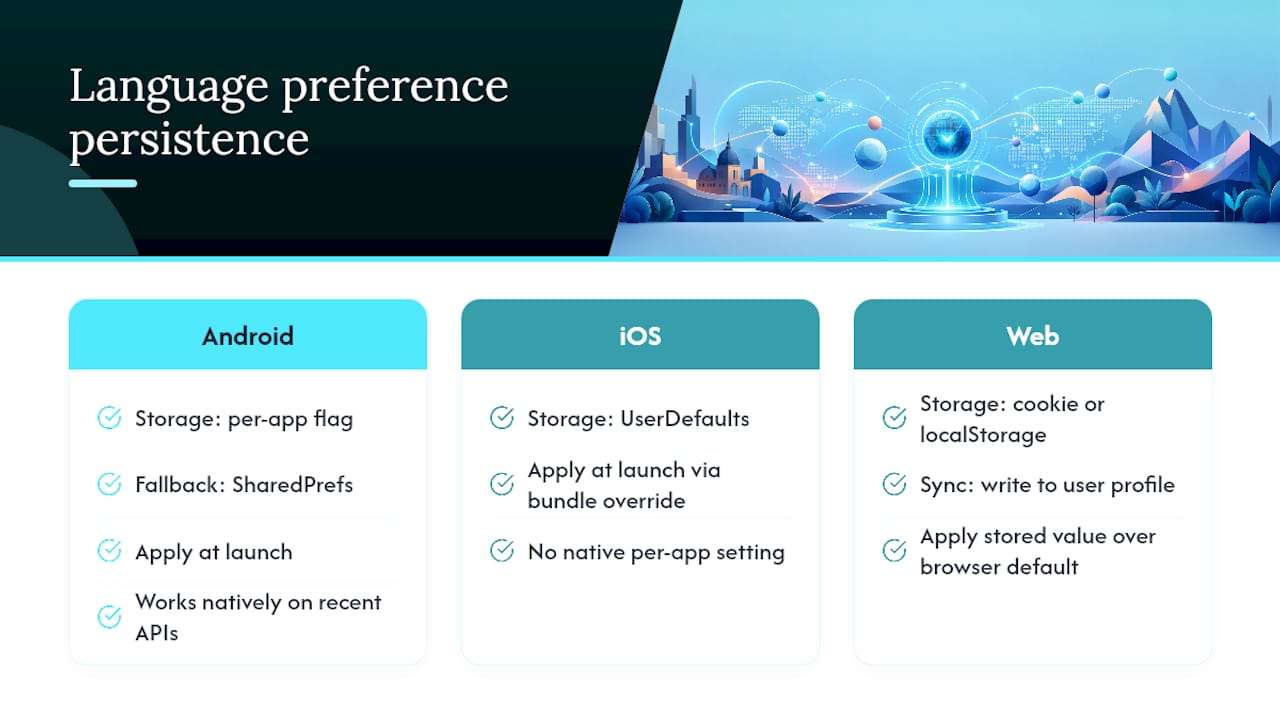
On Android, AppCompatDelegate.setApplicationLocales handles this natively once you’re targeting a recent enough API level. Android’s autoStoreLocales flag saves you from writing your own persistence layer. If you’re supporting older devices, you’ll fall back to SharedPreferences and apply the stored locale at app startup, before any UI renders.
On iOS, there’s no single API equivalent. Most teams store the choice in UserDefaults and apply it by overriding the bundle lookup at launch, since iOS doesn’t let apps fully override the system language the way Android’s per-app settings do.
Web apps typically split the difference: a cookie or localStorage value for anonymous sessions, synced to a user profile field once someone logs in. That second layer matters more than teams expect. A user who sets their language on desktop and opens the app on mobile should see the same language, not the browser’s default.
Whatever mechanism you pick, separate the stored preference from the system locale. Treat the system locale as the first-run default only, never as an ongoing override once someone has made an explicit choice. And log a metric on how often people actually switch away from system default. If it’s a small percentage, invest less in the switcher UI. If it’s substantial, that number is telling you something about who’s actually using the app.
Where Should the Language Switcher Live?
Placement decisions here are really about one question: how often does someone need to change languages after their first session? For most apps, the answer is “almost never,” which means the switcher belongs in settings, not in the primary navigation.
Put it under a clearly labeled “Language” row in account or app settings, using the language’s own name in that language (Español, not Spanish, when listing it as an option) so users can find their language even if the current UI language is unreadable to them. That single detail solves more support tickets than any dropdown styling decision.
For accessibility, the switcher needs a real, focusable, labeled control. A row that’s just tappable with no semantic role fails screen reader navigation. Use a native picker or a properly labeled custom component with role="button" or equivalent, and make sure the selected state is announced, not just visually indicated by a checkmark.
One edge case worth planning for: first-run language detection. Detecting the device or browser locale and pre-selecting it is good default behavior, but always give an explicit override, visible on first launch, not buried three settings screens deep. Teams that skip this get users stuck in the wrong language with no obvious way out, which is a worse experience than defaulting to English and letting people switch.
If you’re exposing language choice inside a broader settings or onboarding flow, the same accessibility and discoverability principles that govern the rest of your interface apply here too, a point covered well in this developer-focused guide to web design and accessibility patterns.
What Changes When You Support Right-to-Left Languages?
Arabic, Hebrew, Urdu, and a handful of other languages read right to left, and that reverses more than text alignment. Icons that imply direction (back arrows, progress indicators, chevrons) need mirrored versions. Padding and margin values defined as left/right need to become start/end in your layout system, or half your UI will look inverted only in RTL locales, which is exactly the kind of bug pseudolocalization testing should catch before a translator ever opens the file.
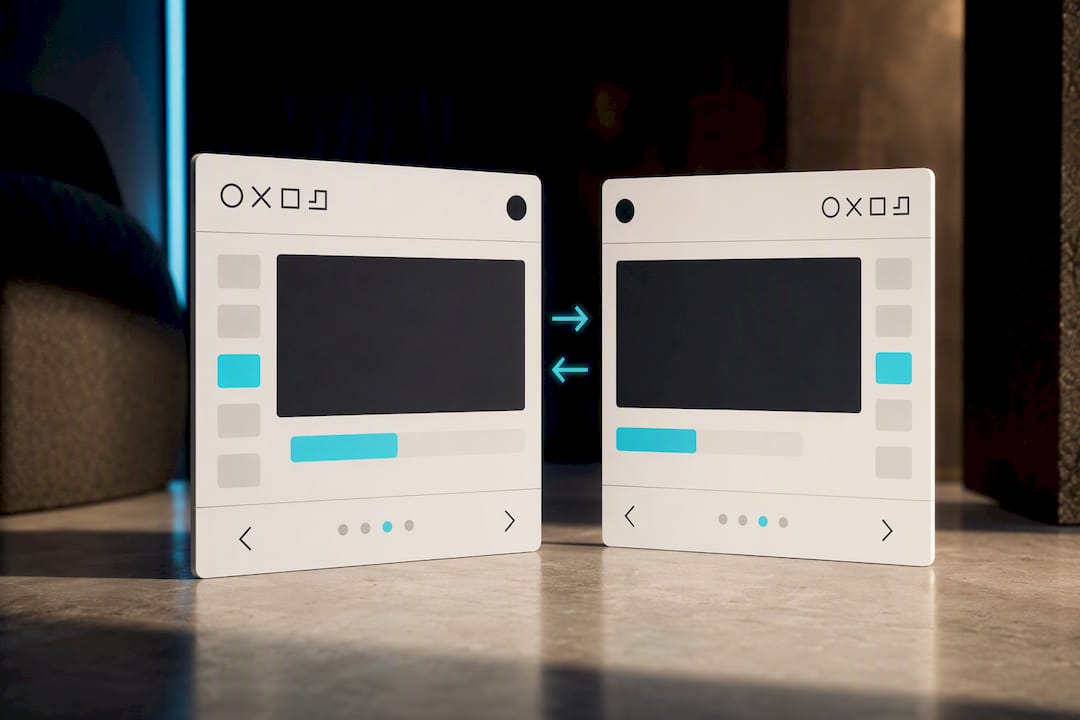
Android and iOS both handle RTL layout mirroring automatically when you use their respective layout direction APIs correctly. Android respects layoutDirection attributes when you use start/end instead of left/right in your XML. iOS mirrors automatically for views using Auto Layout constraints defined with leading/trailing anchors. Flutter’s Directionality widget does the same for widget trees built with directional padding.
The part teams consistently miss is mixed-direction content: an RTL UI displaying a product name or brand string in English. That requires explicit directional markers (Unicode’s LRM/RLM characters) around the embedded text, or the browser and OS bidi algorithm will scramble the visual order of punctuation and numbers next to the Latin text.
Test RTL early, not as a final pass. A pseudolocalized RTL build run through your CI pipeline surfaces broken mirroring and clipped text long before a real Arabic or Hebrew translation exists, which means you’re fixing layout bugs against fake text instead of against a translator’s actual work.
Beyond Translation: Formats That Break Silently
Translating the words is the visible part of localization. Dates, numbers, and currency formatting are the part that breaks silently, because the app still runs. It just shows the wrong thing.
A date written as 03/04/2026 means March 4th in the United States and April 3rd in most of Europe. Hardcoding a date format string instead of using your platform’s locale-aware formatter (DateFormatter on iOS, android.icu.text.DateFormat on Android, intl.DateFormat in Flutter, Intl.DateTimeFormat in JavaScript) is one of the most common silent bugs in shipped apps, and it rarely shows up in manual QA because the tester’s own locale masks the problem.
Number formatting has the same trap: decimal and thousands separators flip between locales (1.234,56 versus 1,234.56), and a hardcoded comma or period will produce a number that’s simply wrong, not just oddly formatted, in roughly half the world’s locales.
Currency is worse, because it compounds two problems: which symbol to show and where to place it, and which currency the number actually represents. Never assume a locale implies a currency. A French-speaking user in Canada, France, and Senegal are three different currencies behind the same language. Use your platform’s locale-aware currency formatter, and pass the actual transaction currency explicitly rather than inferring it from UI language.
Switching Languages Without Restarting the App
Users expect to tap a new language and see the change immediately, not force-quit and relaunch. That expectation is reasonable, and modern platform APIs support it, but it requires structuring your app to react to locale changes rather than reading locale once at launch and caching it.
On Android, calling AppCompatDelegate.setApplicationLocales triggers a configuration change that recreates activities with the new locale applied, which handles most of the work automatically as long as your strings are properly externalized rather than cached in variables set at startup.
On iOS, there’s no single system call that does this cleanly across an entire app. Most teams implement it by observing a locale-change notification and forcing affected view controllers to reload their localized content, since NSLocalizedString calls are evaluated at read time rather than reactively.
Flutter handles this more gracefully through its widget rebuild model. Changing the app’s locale property in MaterialApp triggers a rebuild of the widget tree, and any widget reading from AppLocalizations.of(context) picks up the new strings without extra plumbing.
Across every platform, the failure mode is the same: any string cached in a variable at app startup, rather than looked up fresh, won’t update until restart. Audit for that pattern specifically if users report language changes “not fully applying.”
What Small Teams Get Wrong About Localization Pipelines
Most localization pain has nothing to do with translation quality. It comes from repo access friction, string drift between the English source and everything downstream, and packaging overhead that eats a day every time a new locale gets added.
Arkian’s platform generates locale outputs, runs validation, and packages the result without requiring repository access or a full translation management system. Supported file formats span iOS .strings, Android XML, JSON, YAML, and TypeScript, alongside TTS audio for voice-enabled apps. A collaboration with the Quiet Harbour app is one example of what that packaging discipline looks like in practice.
A typical workflow: Arkian generates a new language pack from your canonical source, your CI pipeline runs completeness and pseudolocalization checks against it, and an LQA reviewer inspects the packaged artifact before it merges. No repo access required at any step.
— Arkian
Get a Sample Packaged Language Output
Arkian produces exactly the artifacts this article walks through: platform-specific outputs generated automatically, validation and packaging handled without a full TMS setup, and multilingual TTS audio when your app needs voice as well as text.

The fastest way to see whether this fits your stack is to look at what Arkian actually produces for a workflow like yours. The language file packaging page walks through the download-ready output structure, including how metadata and checksums travel with each locale folder. If you’re specifically working in Android XML, iOS .strings, or JSON, there are format-specific breakdowns for each on Arkian’s site.
Check who Arkian is built for to confirm the fit for a small team’s workflow, then request a sample package built from one of your own resource files to see the validation and packaging steps run against real strings, not a demo dataset.
Sources
- Per-app language preferences | App architecture | Android Developers
- Localizing package resources | Apple Developer Documentation