
Manage App Languages via CI Without a TMS for Small Teams
Manage App Languages via CI Without a TMS for Small Teams

Managing app languages for release means running a continuous localization pipeline: extract source strings, sync them to translation, validate everything in CI, and package versioned locale bundles, including TTS audio, that ship atomically with each build. The one workflow worth building is a gated extract-push-translate-pull-build loop, not a pile of manual spreadsheet handoffs. Arkian’s collaboration with the Quiet Harbour app shows this works even without full repository access or a traditional translation management system.
TL;DR:
- Small teams must automate each phase of continuous localization, especially gate checks, to prevent broken locales from reaching production.
- Using versioned, platform-specific formats like Android XML, iOS strings, or JSON, with proper naming tied to app releases, is essential for reliable localization bundles.
- Automated validation checks for placeholders, plural forms, file encoding, and syntax are critical to catching errors before releases.
- Fallback language chains should prioritize regional variants over default English, and explicit hierarchy configurations improve localization resilience.
- Outsourcing packaging and validation to services like Arkian can streamline workflows and ensure release-ready localization assets without full TMS integration.
Table of Contents
- What Does It Mean to Manage App Languages Across a Release?
- Building the Continuous Localization Loop for Small Teams
- What File Formats and Packaging Rules Keep Locale Bundles Release-Ready?
- Which CI Checks Should Block a Bad Localized Build?
- Pre-Release Checklist: What to Verify Before Tagging a Localized Build
- Strategies for Fallback Languages and Locale Inheritance
- User Language Detection and Automatic Locale Switching Methods
- Handling Dynamic Content and Runtime Language Changes in the App
- Best Practices for Managing Untranslated or Missing Strings Gracefully
- Legal and Cultural Considerations in Language Management
- Why Automation Matters More Than Perfect Process for Small Teams
- Automate Your App’s Localization Production With Arkian
- Sources
What Does It Mean to Manage App Languages Across a Release?
“Manage app languages” sounds simple until you’re the one debugging a plural mismatch in Polish three hours before a submission deadline. In production terms, it means owning the full lifecycle of every translated string, piece of metadata, and voice asset your app ships with, from the moment a developer writes "welcome_message" in English to the moment a customer in Warsaw hears the correct TTS greeting in their own language.
The industry term for this discipline is continuous localization (sometimes shortened to l10n, with internationalization shortened to i18n). It borrows directly from continuous integration: instead of a single big translation push before launch, strings flow through a pipeline continuously, get validated automatically, and get packaged the same way every time. This differs sharply from the old model where a spreadsheet of strings got emailed to a translation agency and returned weeks later as a mystery ZIP file nobody had tested.
For small teams and independent developers, the stakes are higher than they look. You don’t have a dedicated localization engineer. You have a developer who also owns the CI pipeline, a content person who also writes release notes, and maybe a contractor doing translation on the side. That means the workflow has to be simple enough to run without a full-time babysitter, but structured enough that a rushed Friday release doesn’t ship half-translated screens.
Building the Continuous Localization Loop for Small Teams
The loop has five phases: extract, push, translate, pull, gate, then build. Each phase has a clear owner, and skipping the gate phase is the single most common way small teams ship broken locales.
- Extract. A script pulls every translatable string out of source code into a canonical catalog, usually a JSON or YAML file keyed by string ID. This step should run automatically on every merge to your main branch, not manually before a release.
- Push. The catalog gets uploaded to wherever translation happens, whether that’s a TMS, a contractor’s inbox, or an automated production platform. Hashing the source catalog before upload and skipping the push when the hash matches the last one keeps syncs idempotent and stops you from re-uploading unchanged strings a dozen times a week.
- Translate. Human translators handle nuance and tone; machine translation combined with human review can pre-fill drafts, but every MT segment needs a “needs review” flag until a human clears it.
- Pull. Translations come back into the codebase, ideally as a dedicated branch rather than a direct commit to main.
- Gate. Automated checks run against the pulled translations before anything merges.
- Build. The app compiles with the validated, versioned locale bundle attached.
Ownership matters here. Developers own extraction and the CI wiring. Whoever manages translation, even if that’s one person wearing three hats, owns the TMS relationship and the review pass. Blurring that line is how untranslated strings slip into production.
For reproducibility, pull translations into a dedicated l10n/sync branch and open a pull request rather than merging straight to main. That single habit is what separates a build you can reproduce six months later from one you can’t explain.
Pro Tip: *If you can’t justify a full TMS integration yet, run the loop with a simple script that diffs your source catalog against the last pushed version and only sends the delta.
What File Formats and Packaging Rules Keep Locale Bundles Release-Ready?
Every platform expects a different shape for the same translated string, and getting the format wrong is how apps ship with raw placeholder text instead of real copy.
Android wants a complete strings.xml in each res/values-<locale>/ folder, and a missing default resource can cause a runtime crash on devices set to an unsupported locale. That default res/values/strings.xml is not optional. iOS has moved toward .xcstrings catalogs, with legacy .strings files still common in older codebases. Web and hybrid apps typically export to JSON, TypeScript modules, or YAML, depending on the framework.
Folder and file naming should tie directly to the app version you’re shipping, not just the locale code. A bundle named locale-fr-FR-v2.4.1 tells you instantly which build it belongs to if something breaks after release.
TTS assets need the same rigor. Audio files should carry consistent naming (matching the string key), a documented sample rate, and metadata noting voice, locale, and script version, packaged inside the same versioned bundle as the text strings rather than shipped separately.
| Artifact type | Common format | Key packaging detail |
|---|---|---|
| Android strings | XML | Default res/values/strings.xml required |
| iOS strings | .strings / .xcstrings | String Catalog per Xcode version |
| Web/app data | JSON, TypeScript, YAML | Keyed by string ID, nested by locale |
| Voice/TTS | MP3/WAV | Named by string key, tagged with sample rate and voice |
Each string should also carry context metadata: the UI component it lives in, a max character length for constrained buttons, and a screenshot reference where possible. That’s the detail translators and QA reviewers actually need, and its absence is one of the most common causes of rework in software localization. Arkian’s localization strings support is built around exactly this multi-format packaging problem.
Which CI Checks Should Block a Bad Localized Build?
Four checks catch most localization failures before they reach a user’s screen, and all four should be required, blocking status checks, not optional lint warnings.
- Placeholder parity. Every
%s,{count}, or{{name}}in the source string must appear, in some form, in every translation. A missing placeholder is a runtime crash waiting to happen. - ICU and plural validation. Languages like Arabic and Polish require multiple plural arms; CLDR plural rules define exactly how many each locale needs, and a translation missing an arm will show broken grammar to real users.
- File presence and encoding. Every expected locale file exists, and every file is valid UTF-8. This sounds trivial until a stray BOM character breaks your build parser at 11 p.m.
- Syntactic validation. XML, JSON, and YAML files must parse cleanly before they ever reach a build step.
Visual checks matter just as much, just later in the pipeline. Pseudo-localization, which swaps real strings for elongated, accented placeholder text, surfaces hardcoded strings and layout truncation without waiting for real translations. Pair it with screenshot diffing and a dedicated RTL pass for Arabic or Hebrew layouts, since mirrored layouts break in ways left-to-right testing never catches.
Any MT-generated segment should carry a “needs-review” flag that the gate treats as a soft warning rather than a hard fail, so machine pre-fills don’t block a merge, but they also never reach production silently. To keep pipeline latency reasonable, run structural checks (parity, plurals, encoding) on every commit, and reserve the slower visual and RTL checks for pre-release branches only.
Pro Tip: Parallelize your locale checks by language rather than running them sequentially. Ten locales checked in parallel take roughly the same wall-clock time as one, and that difference adds up fast once you’re shipping weekly.
Pre-Release Checklist: What to Verify Before Tagging a Localized Build
A short, disciplined checklist beats a long one nobody follows. Run these in order before tagging any release:
- Confirm every key present in the source catalog has a corresponding entry in every target locale, with no orphaned placeholders.
- Verify plural arms for each locale against CLDR rules, testing edge cases like 0, 1, 2, 5, 11, and 21 items where grammar shifts.
- Run pseudo-localization and a screenshot diff pass, including a dedicated RTL check for Arabic or Hebrew.
- Confirm accessibility labels and screen-reader text are translated, not just visible UI copy.
- Play back TTS audio for each locale to catch mispronunciations or clipped files.
- Localize app store metadata (title, description, screenshots) alongside the app itself.
- Sign off through the l10n/sync pull request, merge, and tag the locale bundle to the exact app version being released.
Missing even one of these steps is how apps ship with an English fallback button sitting in the middle of a fully translated Japanese screen. If something breaks post-release, rolling back is only safe when the locale bundle tag matches the app version tag exactly, since a mismatched pair reintroduces the mixed-language bug you were trying to fix.
Strategies for Fallback Languages and Locale Inheritance
Every app needs a fallback chain, and the mistake most teams make is defaulting everything to English when a more specific fallback would serve users better. A user set to fr-CA (Canadian French) who has no Canadian-specific translation should fall back to general fr, not straight to English. That intermediate step preserves language even when regional nuance isn’t available yet.
Locale inheritance should be explicit in your configuration, not accidental. Define a hierarchy: fr-CA inherits from fr, which inherits from your default locale. When a string is missing at the most specific level, the system checks the next level up automatically instead of failing or silently defaulting to the base language for the entire string catalog.
Android and iOS both support this kind of resource fallback natively through their resource qualifier systems, but web and hybrid apps often need to build it themselves in the i18n library layer. Whatever framework you use, test the fallback chain deliberately. Pull a build, disable one regional locale file, and confirm the app degrades to the parent language instead of crashing or showing raw key names like error_401_msg to a real user.
User Language Detection and Automatic Locale Switching Methods
Most apps detect language in three layers, and the order you check them in matters more than most teams realize. First, check any explicit in-app preference the user has already set, since a deliberate choice should always override system defaults. Second, read the device or OS-level locale setting. Third, fall back to IP-based geolocation only as a last resort, since it’s the least reliable signal and frequently wrong for travelers or VPN users.
Automatic switching should happen at app launch and, for apps with long sessions, should re-check quietly if the device locale changes mid-session, such as when a user changes phone settings while your app is running in the background. Don’t force a language change that discards unsaved user input; queue it for the next screen transition instead.
One detail teams overlook: detected language and detected region are not the same signal, and conflating them causes real problems. A device set to English with a region of Germany might need metric units and a DD.MM.YYYY date format even though the display language stays English. Separate the “which language” decision from the “which formatting conventions” decision in your locale logic, and you’ll avoid a whole category of subtle regional bugs that only show up in customer support tickets.
Handling Dynamic Content and Runtime Language Changes in the App
Static UI strings are the easy part. The harder problem is dynamic content: user-generated text, server-pushed notifications, and data pulled from a backend that doesn’t know which locale the client is running.
For server-driven content, pass the user’s locale as a parameter on every API request rather than assuming the server can infer it. Push notifications need special handling since they’re often composed and queued before the app knows the current session’s locale, so store the locale preference server-side and localize the notification payload at send time, not at display time.
Runtime language switches, where a user changes their in-app language preference without restarting the app, require your UI framework to re-render text without a full reload. React and Flutter both handle this with locale-aware context providers, but the more common failure is a screen that half-updates: labels change language while a cached string from an earlier network call still displays in the old one. Test this scenario directly rather than assuming a locale switch cascades cleanly through every screen.
Formatted content deserves its own pass. Dates, currency, and number formatting need to shift with locale independently of the visible language, using ICU number and date formatting rather than manual string concatenation, which breaks the moment a translator needs to reorder a sentence around a number.
Best Practices for Managing Untranslated or Missing Strings Gracefully
A missing translation should never mean a blank screen or a raw string key like checkout_button_v3 showing up in front of a paying customer. The fallback locale chain covered earlier handles most of this automatically, but a few additional habits close the remaining gaps.
Log every fallback event. If your app quietly falls back to English for a Portuguese user forty times a day on one screen, that’s a signal a specific string is missing, not an isolated glitch. Build a lightweight dashboard or even a simple log aggregation query that surfaces the most frequently missing keys by locale, so translation effort goes where it’s actually needed instead of wherever a developer remembers to look.
Never ship a build where the CI gate found missing keys and let it through anyway “just this once.” That exception becomes the norm within a month. Treat a missing key in a supported locale as a hard build failure, the same way you’d treat a missing dependency.
For genuinely optional or long-tail content, such as niche help articles or rarely seen error states, a graceful English fallback with a small “translated content unavailable” note is honest and unobtrusive. It’s a far better experience than a broken layout or a literal placeholder string, and it buys your team time to fill the gap without blocking a release over content nobody will see this week.
Legal and Cultural Considerations in Language Management
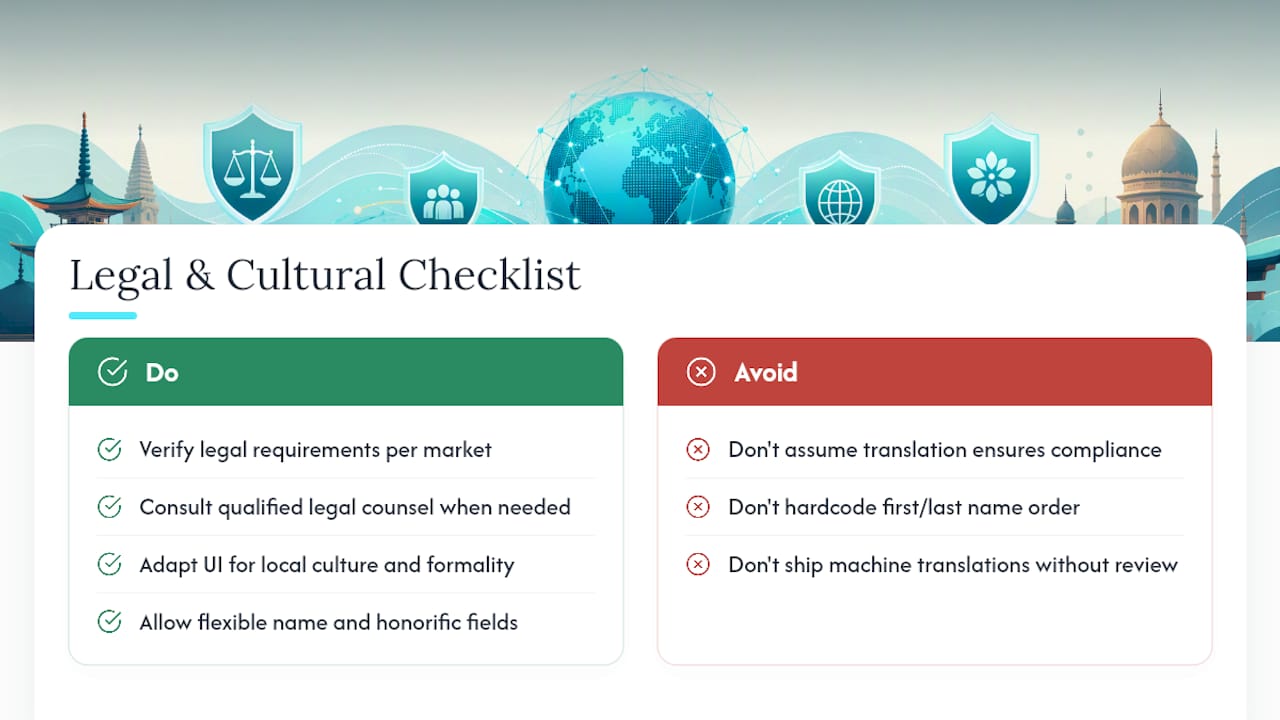
Language choices carry legal weight in some markets, and treating localization as a purely technical problem misses real compliance risk. Canada’s language laws for Quebec, the European Union’s consumer protection rules that require certain disclosures in the user’s own language, and various data-privacy notices all impose specific translation obligations that vary by jurisdiction and by what your app actually does. If your app processes payments, collects health data, or targets minors, check the specific legal requirements for each market you release in rather than assuming a good translation covers the compliance bar.
Cultural adaptation goes beyond legal minimums. Color symbolism, imagery, humor, and even the formality of address (the difference between informal and formal “you” in German or French) all shape whether a translation feels native or feels like it was run through a tool and shipped without review. Date formats, currency symbols, and even reading direction changes for RTL languages like Arabic and Hebrew aren’t cosmetic; they affect whether the app is actually usable.
Names and honorifics deserve specific care. Some cultures list family name before given name, and hardcoding a “first name, last name” field order into your UI will produce genuinely embarrassing results for a meaningful share of your global user base. None of this replaces qualified legal counsel for markets with specific regulatory requirements, but a localization workflow that never asks these questions is incomplete regardless of how clean its CI pipeline looks.
Why Automation Matters More Than Perfect Process for Small Teams
The conventional wisdom says you need a full TMS and a dedicated localization engineer before continuous localization is worth attempting. That’s backwards for a five-person team. The teams that succeed start with a minimal, gated pipeline and let automation absorb the repetitive work, not the judgment calls.
What we’ve seen in practice with the Quiet Harbour collaboration is that packaging, not translation quality alone, is where small teams lose the most time. Producing Android XML, iOS strings, JSON, and TTS audio in parallel, correctly named and versioned, without needing repository access, is what actually lets a two-person team ship in twelve languages instead of three.
Start small: gate one check (placeholder parity) before adding the rest. Add pseudo-localization next. Iterate from there.
— Arkian
Automate Your App’s Localization Production With Arkian
Arkian turns the CI-first workflow described above into a service you don’t have to build yourself. Instead of wiring a TMS, writing extraction scripts, and hand-packaging locale files every release, you upload your source catalog and get back validated, delivery-ready assets, without granting repository access or standing up a full translation management system.

The deliverables match exactly what this playbook calls for: Android XML string files with correct default resources, iOS .strings and .xcstrings catalogs, JSON and YAML exports for web and hybrid apps, and structured multilingual TTS audio named and versioned to match your release. Every package arrives organized by locale and tagged for the build it belongs to, so the atomic-release discipline covered above comes built in rather than bolted on.
If you’re a small team weighing whether to build this pipeline in house or hand off the production work, check who Arkian is built for and see how the packaging maps to your next release.
Sources
For implementation details beyond this playbook, the Android Developers localization guide covers resource qualifiers and default string requirements in depth. The continuous localization and CI/CD sync guide from i18n-l10n.com walks through the extract-push-translate-pull-gate-build loop in more technical detail, and the modern software localization process guide covers translation memory and termbase management for teams scaling beyond a handful of languages.