
Runtime Locale Switching for Developers: 3 Ways and Validated Bundles
Runtime Locale Switching for Developers: 3 Ways and Validated Bundles

Use the platform’s native per-app locale API when one exists; otherwise, keep a single source of truth for locale state and swap resources through dynamic imports rather than forcing a full reload. Android’s LocaleManager, AndroidX’s AppCompatDelegate, and web tools like Lit all converge on this pattern. Reload-based transform builds still win when performance matters more than instant switching.
TL;DR:
- System-level locale APIs are recommended on platforms that support them, with Android 13+ using LocaleManager and older versions falling back to AppCompatDelegate.
- Runtime locale switching involves changing resources dynamically and updating the UI without reloads, but can introduce import latency and rendering delays.
- Web localization can be done via dynamic imports for instant switches or separate build files for better performance, depending on content volume and user experience priorities.
- Flutter, Jetpack Compose, Qt, SwiftUI, and Kotlin Multiplatform all use a shared pattern of a locale state variable and resource reloading, but specific implementations vary per framework.
- Common bugs include perceived lag, double recreations on Android, stale references, and persistence mismatches, which require preloading, proper lifecycle management, and thorough testing to fix.
Table of Contents
- What Are Your Options for Switching Locale at Runtime?
- How Do You Implement Runtime Locale Switching on Android?
- Should Web Apps Use Runtime Imports or Transform Builds?
- How Do Flutter, Qt, SwiftUI, and Kotlin Multiplatform Handle It?
- What Goes Wrong With Runtime Locale Switching (and How Do You Fix It)?
- What’s a Practical Checklist for Shipping This Feature?
- How Does Automated Localization Packaging Fit Into Runtime Switching?
- Sources
What Are Your Options for Switching Locale at Runtime?
Three approaches cover almost every case you’ll run into. Each trades a bit of speed for a bit of simplicity, or the reverse.
- System-level per-app locale. The OS or framework tracks language per app and persists it for you. Best UX, least code, but only works where the platform actually supports it (Android 13+, some desktop frameworks).
- Runtime dynamic switching. Your app holds a locale state variable, swaps string resources on the fly (via dynamic imports, translator objects, or context providers), and re-renders without restarting. Smooth for users, but adds import latency and re-render complexity you have to manage yourself.
- Transform builds (reload-based). You generate a separate build per locale at compile time. Zero runtime overhead, dead simple to reason about, but changing language means reloading the page or relaunching the app.
Pick system-level APIs whenever your platform offers them. Reach for runtime dynamic switching when you need in-app language toggles without a reload, especially on the web or in Compose. Choose transform builds when you’re shipping a marketing site or a performance-critical SPA where every kilobyte counts.
How Do You Implement Runtime Locale Switching on Android?
Android gives you two real paths depending on which API level you’re targeting, and mixing them up is the single most common mistake teams make.
- On API 33 and above, call
LocaleManager.setApplicationLocales()directly. This is the officially supported route, and it wires straight into system Settings so users can change your app’s language without opening it. - On API 32 and below, fall back to
AppCompatDelegate.setApplicationLocales()from AndroidX. It mimics the same behavior and AndroidX quietly routes the call to the system API once the device is upgraded. - Pass an empty
LocaleListto tell the app to follow the system locale instead of a custom override. This is the “reset to default” behavior most apps need in a settings screen.
Both APIs trigger a configuration change, which usually means your current Activity gets recreated. That’s expected, and fighting it by calling recreate() yourself on top of the system-triggered recreation is a classic double-recreate bug that produces a visible flicker. Instead, hold transient UI state in a ViewModel or, in Compose, a CompositionLocal, so nothing gets lost when the Activity rebuilds. The Android developer documentation on per-app language preferences walks through this lifecycle behavior in detail, and the LocaleManager API reference documents the exact method semantics you’ll be calling.
If your app previously rolled its own locale persistence with a custom SharedPreferences layer, plan a one-time migration to AndroidX’s storage, or set autoStoreLocales in your manifest metadata, so the system and your legacy prefs don’t drift out of sync. Also confirm your locale_config resource lists every supported language and that RTL layouts are flagged correctly, since a missing RTL attribute is an easy way to ship a broken Arabic or Hebrew build.

Pro Tip: Test the empty-LocaleList “follow system” path explicitly. It’s the one case teams forget to QA, and it’s exactly what happens when a user taps “System default” in your settings screen.
For real code, the KotlinLocalization library demonstrates both a setNewLocale() helper for classic Views and a rememberLocaleManager() composable for Jetpack Compose, which is worth studying even if you don’t adopt the library outright.
Should Web Apps Use Runtime Imports or Transform Builds?
Lit’s localization tooling is the clearest illustration of this trade-off, and it’s worth understanding even if you’re not using Lit directly, because the same two modes show up under different names in nearly every web localization tool.
Runtime mode dynamically imports a per-locale module when the user switches languages. No reload, no flash of the wrong language, but you’re paying a real cost.
- Runtime mode adds roughly 1.27 KiB of extra minified and compressed JavaScript to handle the dynamic import machinery.
- Transform mode generates a separate build per locale at compile time, with zero runtime overhead, at the cost of a page reload to change language.
- Dynamic import latency depends heavily on network conditions and bundle size, so the 1.27 KiB figure is a baseline, not a ceiling for larger string catalogs.
If your app is content-heavy or performance-sensitive, run the transform build and accept the reload. If your users expect an in-app language toggle that feels instant, runtime mode is the right call, but preload the locale module ahead of time (on hover, on settings-page mount, or right after initial page load) so the import cost is already paid before the user actually clicks “switch.”
How Do Flutter, Qt, SwiftUI, and Kotlin Multiplatform Handle It?
Every framework solves this the same underlying way: one locale state variable, one notification mechanism, and a thin adapter that actually swaps the resources.
- Flutter apps typically hold locale in a top-level provider or
ChangeNotifier, persist the choice withSharedPreferences, and rebuild the widget tree when the notifier fires.MaterialApp.localepicks up the change automatically. - Jetpack Compose re-resolves
stringResource()calls whenever the composition recomposes, so as long as your locale state change triggers recomposition, the UI updates without any manual string reloading. - Qt apps use a
TranslatorManagerpattern: load aQTranslator, install it, then call a retranslate method likeQQmlEngine::retranslate()to push updated strings into the UI. Qt 6.10 and later simplify this by reducing the manual translator removal steps developers used to have to write themselves. - SwiftUI reads locale from the environment, but watch out for
LocalizedStringKeyvalues that get cached inside a view’s identity. If a view doesn’t recompute its identity on locale change, the string can silently stay stale. - Kotlin Multiplatform projects usually define a common locale API in shared code, then wrap it with a
LocalizedAppobject per platform that calls the native mechanism, Android’sAppCompatDelegate, iOS’s bundle switching, and so on, behind one interface.
What Goes Wrong With Runtime Locale Switching (and How Do You Fix It)?
Most runtime-switching bugs fall into a handful of predictable categories, and each one has a known fix.
- Perceived lag on switch. Reproduce it by measuring the time between the user’s tap and the first re-rendered frame. Community reports on large apps and games confirm this lag is real, not imagined, and the fix is almost always preloading or caching the locale bundle before the user requests it.
- Double recreation on Android. If you call
recreate()manually after the system already recreated your Activity fromsetApplicationLocales(), you get a visible double flicker. Let the system handle it once. - Stale context or view references. Holding onto a
Contextor view reference across a locale-triggered recreation is a common memory leak source; scope those references to the lifecycle that actually survives. - Persistence drift. Custom SharedPreferences-based locale storage that isn’t migrated to AndroidX conflicts with what system Settings displays to the user.
- Untested “follow system” paths. Automated instrumented UI tests should explicitly assert both the override case and the empty-locale system-default case, not just the happy path.
Pro Tip: Add an OS-level verification step to your test plan, actually change the device or emulator’s system language and confirm your app’s “follow system” setting reacts correctly, not just your in-app override.
What’s a Practical Checklist for Shipping This Feature?
- Declare every supported locale in your
locale_configresource or platform equivalent. - Wire the platform API call (
LocaleManagerorAppCompatDelegate) behind a single locale-change function. - Persist locale choice through AndroidX storage, not a custom preferences layer.
- Confirm Compose screens use
stringResource()so recomposition picks up new strings automatically. - Write instrumented tests for override, follow-system, and RTL locales.
- Verify resource shrinking hasn’t stripped a locale you still support before release.
| Checklist area | What to verify |
|---|---|
| API wiring | System API called on 33+, AppCompatDelegate fallback below |
| Persistence | AndroidX storage, no orphaned custom prefs |
| UI state | ViewModel or CompositionLocal survives recreation |
| Testing | Override, follow-system, and RTL cases all covered |
| Release | Resource shrinking preserves all shipped locales |
Structuring your language files consistently before you ever touch this code, so your Android XML, iOS .strings, and JSON bundles all follow the same key naming, saves you from half these bugs before they happen. Arkian’s guide to Android XML string packaging covers that groundwork if you’re setting it up from scratch, and teams managing multiple site locales alongside app locales may also find WordPress Multisite’s approach to scalable language management useful for keeping server-side and app-side locale strategy aligned.
How Does Automated Localization Packaging Fit Into Runtime Switching?
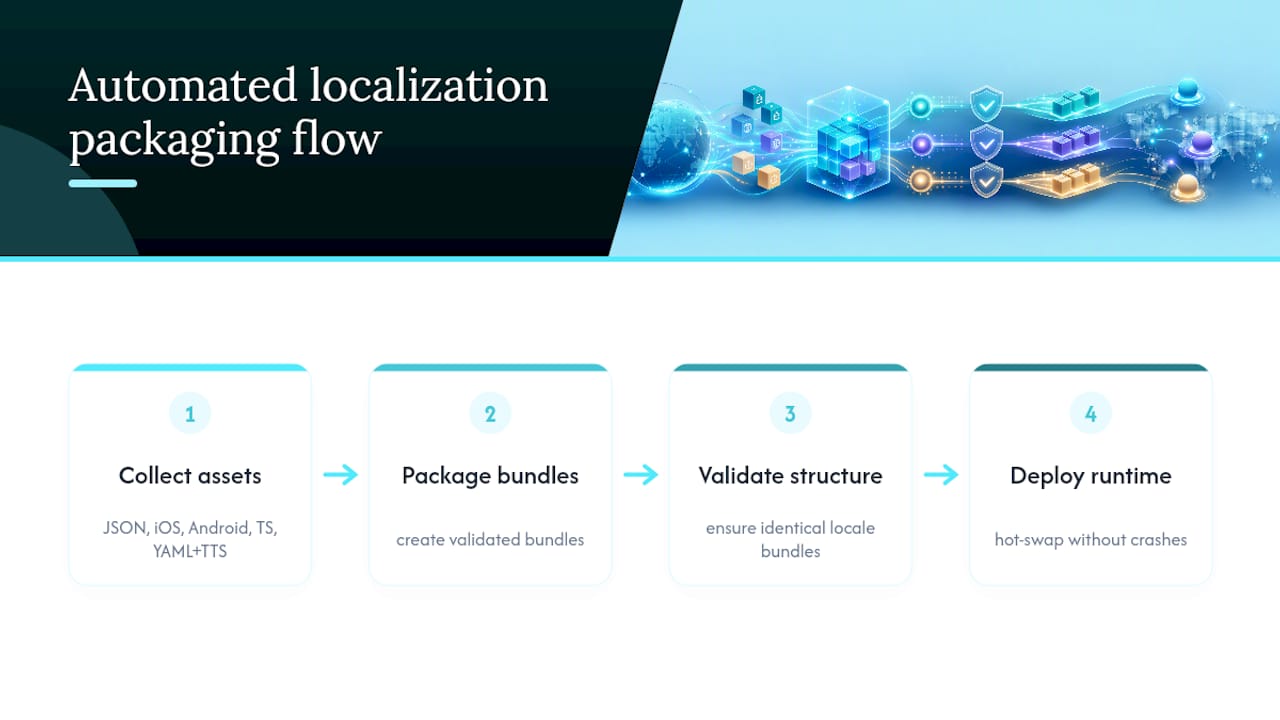
Runtime switching only works cleanly if the underlying language files are consistent, and that’s where a lot of teams quietly lose hours. Arkian automates the packaging of JSON, iOS .strings, Android XML, TypeScript, YAML, and TTS voice assets into validated bundles, so a missing key in one locale doesn’t surface as a runtime crash after you’ve already shipped.
We built that validation step after watching teams hand-patch string files under deadline pressure. Our work packaging the Quiet Harbour app’s multilingual release showed how much smoother a hot-swap goes when every locale bundle is structurally identical before it ever reaches a device. If you’re setting up runtime switching now, start with validated string packaging rather than debugging missing-key errors after the fact, and check who Arkian is built for to see if your team’s workflow fits.
— Arkian
Sources
- Per-app language preferences | App architecture | Android Developers
- Localization – Lit
- Localized Clock with Runtime Language Switch — Qt Linguist Examples
- ninenox/KotlinLocalization
- Performance Issue when switching Locale at runtime (Localization) — Unity Discussions